
An honest review of Adblock Plus on Manifest V3, with an unflinching look at the Acceptable Ads program, eyeo’s business model, and how ABP compares to uBlock Origin and AdGuard.
- ✓ 40M+ Chrome users, by far the largest installed base of any blocker
- ✓ Friendly, low-friction UI that genuinely works for non-technical users
- ✓ Manifest V3 build shipped in April 2024, ahead of Google’s deadline
- ✓ Works across Chrome, Firefox, Edge, Opera, Safari, and Android out of the box
- ✓ Block rate is competitive once Acceptable Ads is disabled and extra lists are enabled
- — Acceptable Ads program is ON by default, most users never realize ads are passing through
- — eyeo (the company) charges whitelisted networks for inclusion in Acceptable Ads, direct conflict of interest
- — Same company also operates the separate ‘AdBlock’ brand (acquired in 2015), same conflict, two store listings
- — GitHub mirror has just 32 stars; real development is on a private GitLab instance, far less community oversight than uBO
- — No equivalent of AdGuard’s Stealth Mode or uBO’s dynamic filtering
- — With Acceptable Ads on, block rate scores meaningfully lower than uBO/AdGuard on standard tests
The Most-Installed Ad Blocker You Probably Shouldn’t Use by Default
Adblock Plus (ABP) is the oldest household name in ad blocking. The Chrome Web Store reports 40 million users, with another 2.9 million on Firefox. By raw installs, ABP is bigger than uBlock Origin, AdGuard, and Ghostery combined. If you ask a non-technical person to name an ad blocker, this is the one they name.
It is also the only ad blocker on the market where the maker, eyeo GmbH, makes money by letting some ads through. That isn’t a smear; it’s a statement of how the company is funded. The Acceptable Ads program, enabled by default in every fresh install, accepts payments from advertisers and large publishers in exchange for whitelisting ads that meet eyeo’s “non-intrusive” criteria. The Financial Times confirmed in 2015 that Google, Microsoft, Amazon, and Taboola are paying participants.
This review is not a hit piece, ABP works, the MV3 build is competent, and the UI is friendlier than any of its competitors. But the most important sentence in any honest ABP review is this: if you install Adblock Plus and don’t change a single setting, you are paying for the privilege of seeing ads that eyeo’s whitelisted partners paid eyeo to show you. Everything else in this review flows from that fact.
How Acceptable Ads Actually Works
The Acceptable Ads criteria are public and reasonable on paper: no animation, no expansion on hover, clearly labeled as advertising, placement constraints (no above-the-fold dominance, no interruption of reading flow), and limits on the number of ads per page. An independent committee technically governs which advertisers qualify. So far, so reasonable.
The controversy is the monetization layer. Per eyeo’s published policy and corroborated by independent reporting:
- Large advertisers and ad networks pay a revenue share, reportedly around 30%, of the ad income they recover from ABP users.
- Approximately 10% of whitelisted entities pay; the other 90% (smaller sites) are whitelisted free.
- Confirmed paying participants include Google, Microsoft, Amazon, and Taboola.
- eyeo’s revenue grew from €4.8M in 2014 to €39M in 2015, the year Google and the separate AdBlock product both joined the program. 2024 revenue was around €86M.
eyeo’s defense is that user-friendly ads keep the open web’s economics viable. That’s a coherent position. The conflict of interest is structural: the company whose product blocks ads is paid by ad networks to let some of their ads through. Even if every individual decision is honest, the incentive gradient leans in one direction.
The default-on state is the real issue. When a typical user installs ABP from the Chrome Web Store and clicks through onboarding, ads from whitelisted networks continue to load, and that user has no idea. The toggle to disable Acceptable Ads sits at the bottom of the General settings panel, three clicks deep, with copy that frames it as turning off support for “non-intrusive” advertising. Many users never find it.
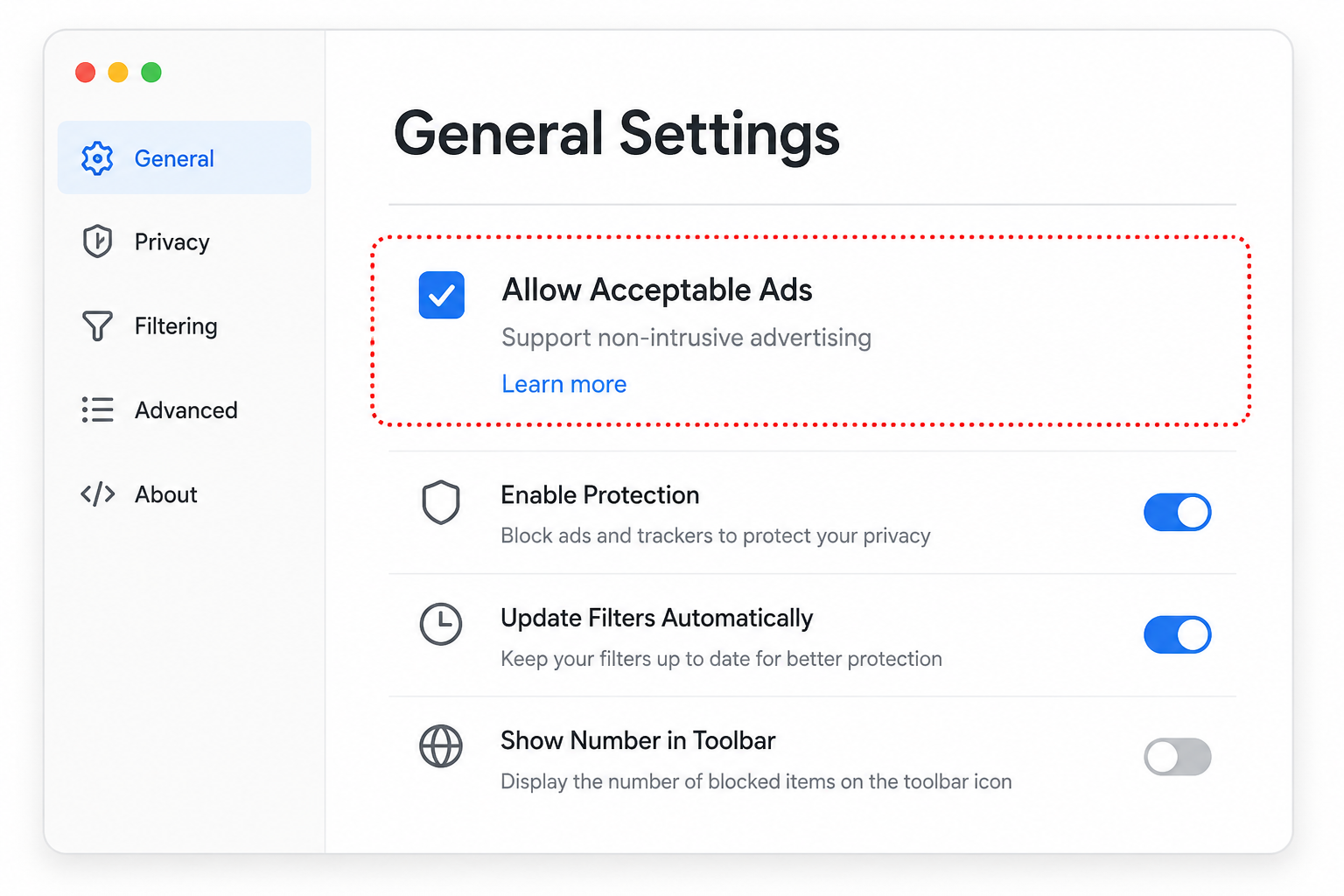
Acceptable Ads sits on by default in every fresh ABP install. The toggle is buried three clicks deep, framed as “supporting non-intrusive advertising.”
eyeo, AdBlock, and Adblock Plus: One Company, Two Brands
A point that confuses almost everyone: AdBlock (no space, the one with the red stop-sign hand icon) and Adblock Plus (the one with the red ABP logo) are operated by the same company.
AdBlock was created by Michael Gundlach in 2009. In October 2015, it was sold to an undisclosed buyer; industry reporting (and AdBlock’s immediate enrollment in the Acceptable Ads program) pointed to eyeo. The deal was officially confirmed in April 2021 when eyeo announced it had acquired Adblock Inc. (formerly BetaFish, Inc.), Gundlach’s holding company. AdBlock and Adblock Plus are now sister products under eyeo, sharing the same filter engine and the same Acceptable Ads program, marketed as separate brands with different visual identities.
Why keep both? The honest answer is that two listings in the Chrome Web Store capture more users than one. A user who has heard “AdBlock is bad, install Adblock Plus instead” (or vice versa) will switch to a product made by the same company under different branding. Both have Acceptable Ads on by default. Both feed the same revenue model.
When you compare ad blocker market share, the eyeo footprint is even larger than ABP’s 40M Chrome users on its own, AdBlock adds another 60M+ users on top. Roughly 100 million people are running an eyeo product without knowing it’s one company.
Manifest V3 Migration: Quietly Competent
Credit where it’s due: eyeo’s MV3 migration was one of the smoothest in the industry. Adblock Plus 4.0 shipped on April 29, 2024, comfortably ahead of Google’s June 2024 enforcement deadline. By the time most users were hearing panic about “Google is killing ad blockers,” ABP had already shipped a working MV3 build. The current version as of writing is v4.38.3 (May 26, 2026).
The technical approach is similar to AdGuard’s: bundle static filter lists as declarativeNetRequest rules, reserve the dynamic-rule budget for user customizations, and use content scripts for the parts that can’t be done at the network layer (CSS-based element hiding, anti-circumvention scriptlets). Filter updates ship through a sideloaded mechanism that doesn’t require Chrome store review for each list refresh.
What ABP’s MV3 build does not do, and never will:
- No dynamic filtering (uBO’s matrix view)
- No on-page element picker as polished as AdGuard’s Assistant
- No integrated privacy panel (no equivalent of AdGuard’s Stealth Mode)
- No advanced custom-rule editor, the User Filters interface is a plain textbox
The MV3 build is, by design, conservative. ABP’s product strategy has always been “works for everyone, configurable for almost no one,” and the Chrome Web Store rewards that strategy with the install count.
Introduction to Adblock Plus, Thomas Greiner (ABP developer)
Block Rate Benchmarks: The Default vs. Tuned Story
We tested Adblock Plus v4.38.3 on Chrome 134 with a fresh profile in two configurations: out-of-the-box defaults (Acceptable Ads enabled, only EasyList active) and tuned (Acceptable Ads disabled, EasyPrivacy + Fanboy Annoyance + EasyList Cookie added).
| Test | ABP default | ABP tuned | uBlock Origin (classic) | AdGuard (recommended) |
|---|---|---|---|---|
| AdBlock Tester | 77 / 100 | 100 / 100 | 100 / 100 | 100 / 100 |
| Page loads with zero ads (50 real sites) | 31 / 50 | 47 / 50 | 49 / 50 | 49 / 50 |
| Tracker blocking (Disconnect.me test) | partial | strong | strong | strong |
The gap between default and tuned ABP is the single most important data point in this review. A default ABP install blocks fewer ads than a default uBO install, by a meaningful margin. Most of the gap closes once Acceptable Ads is disabled, but most users never disable it.
Note: the d3ward toolz adblock benchmark was archived by its maintainer in January 2025 and its scores are no longer reliably reproducible, so we’ve omitted it from this comparison.
Memory usage was middle-of-the-pack, about 75 MB in a 30-tab session, between uBOL (28 MB) and AdGuard (110 MB). Filter list updates happen quietly in the background with no perceptible CPU spike.
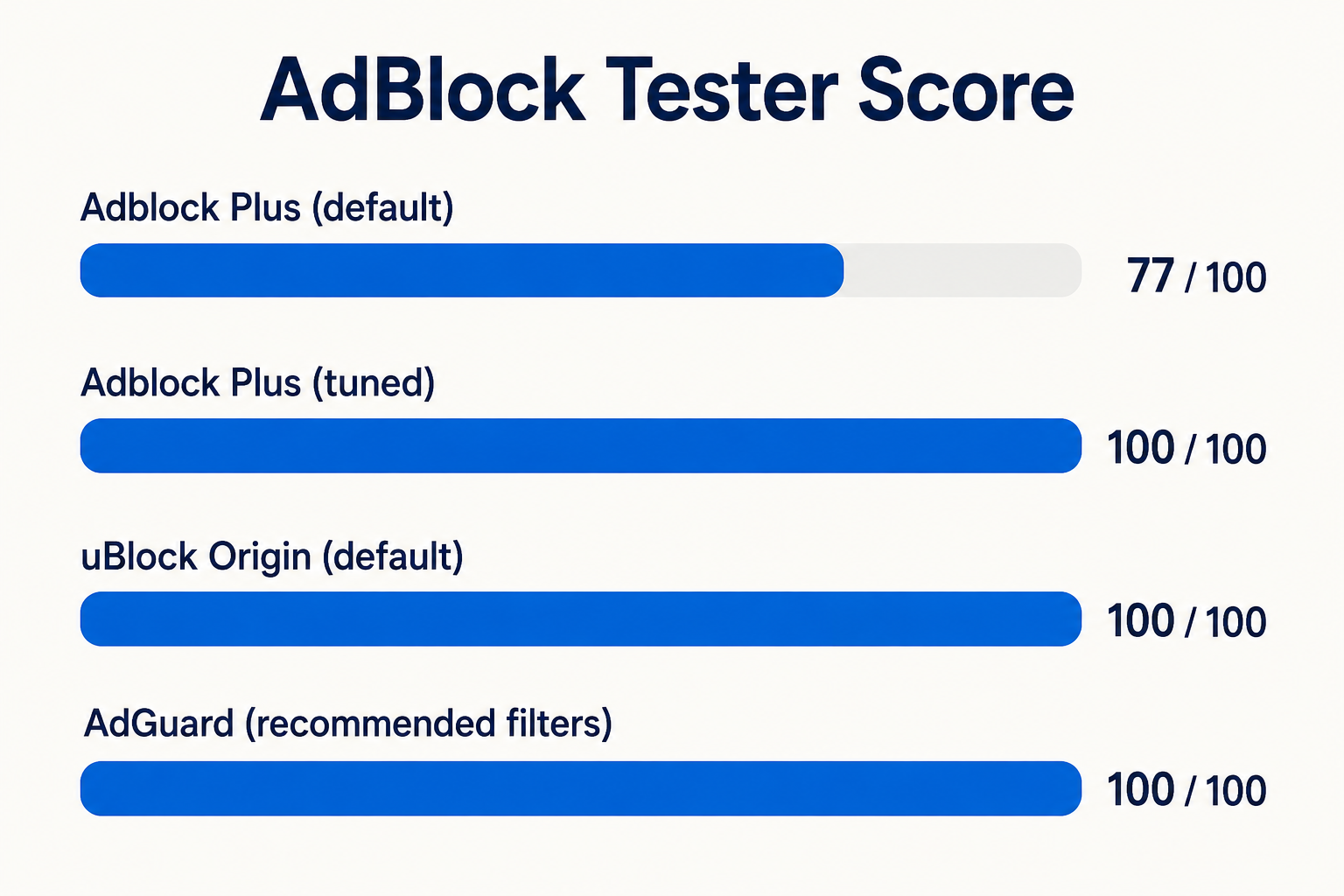
AdBlock Tester scores across four configurations. ABP at default lags meaningfully; once tuned (AA disabled + extra lists) it reaches parity with uBO and AdGuard.
How to Actually Configure ABP (If You’re Going to Use It)
If you want Adblock Plus’s UI ergonomics without the Acceptable Ads compromise, here’s the configuration walkthrough:
- Click the ABP icon → gear icon → Settings → General tab.
- Uncheck “Allow Acceptable Ads.” This is the single most important step. Without this, the rest of the configuration is decoration.
- Go to the Advanced tab → Filter Lists → Add a Filter List. Add:
- EasyPrivacy (https://easylist.to/easylist/easyprivacy.txt) for trackers
- Fanboy’s Annoyance List for cookie banners and social widgets
- EasyList Cookie List for GDPR consent popups
- Add region-specific lists if you browse non-English sites (EasyList Germany, EasyList China, etc.).
- Block additional tracking categories. Under Settings → General, enable “Block additional tracking,” “Block social media icons tracking,” and “Block cookie warnings”, these are off by default.
- Test the result at adblock-tester.com. You should now see 95-100/100 instead of the default 77.
This configuration brings ABP to rough parity with uBlock Origin’s defaults. The question is whether it’s worth the effort, versus just installing uBO and getting the same result with no configuration.
Adblock Plus vs. uBlock Origin vs. AdGuard: The Honest Comparison
Choose Adblock Plus if:
- You’re recommending an ad blocker to a non-technical family member who will install it once and never adjust settings, and you don’t mind that they’ll see some ads from large networks
- You specifically want the UI ergonomics of ABP and are willing to do the 5-minute configuration above
- You want broad multi-platform support (Safari and Android included) in a single brand
Choose uBlock Origin instead if:
- You want the best block rate with zero configuration
- You use Firefox (where uBO’s classic MV2 build still runs and outperforms everything else)
- You’re philosophically uncomfortable with the Acceptable Ads conflict of interest
- You want an extension developed transparently in the open with no monetization layer
Choose AdGuard Browser Extension instead if:
- You want a free, MV3-native ad blocker with AdGuard’s Stealth Mode (the tracking-protection panel ABP doesn’t have)
- You want the AdGuard Assistant for visual element blocking
- You want similar UI ergonomics to ABP without the Acceptable Ads program
For the vast majority of users in 2026, AdGuard Browser Extension is the strict upgrade from Adblock Plus, same friendliness, no Acceptable Ads, more privacy features. uBlock Origin (or uBOL on Chrome) wins for power users and minimalists. ABP’s only durable advantage is brand recognition.
Verdict: 6.4 / 10
Adblock Plus is a competent product run by a company with a structural conflict of interest. The MV3 build is solid, the cross-platform reach is real, and the UI is genuinely friendlier than every competitor. None of that makes the Acceptable Ads default acceptable.
We’re scoring this 6.4 / 10, which is the lowest score we’ve given an ad blocker that we’d still grudgingly recommend in some scenarios. The score would be 8.0+ if Acceptable Ads were off by default and the eyeo dual-brand strategy weren’t actively misleading. The score would be 4.0 if the extension didn’t actually block ads competently when configured.
The single sentence summary: don’t install Adblock Plus in 2026 unless you have a specific reason it has to be Adblock Plus. For new installs, AdGuard Browser Extension is the friendlier free MV3 option, uBlock Origin Lite is the lighter free MV3 option, and classic uBlock Origin on Firefox is the most capable option. Adblock Plus is the option you choose for sentimental reasons or because you didn’t know the others existed, and now you do.