
An honest review of AdGuard’s free browser extension on Manifest V3, with original benchmarks, Stealth Mode breakdown, and a side-by-side comparison to uBlock Origin.
- ✓ Best-in-class Stealth Mode (tracking protection panel) with one-click toggles
- ✓ AdGuard Assistant lets non-technical users block specific page elements
- ✓ Annoyance filters cover cookie banners, push notifications, social widgets
- ✓ 100/100 on AdBlock Tester with default filters enabled
- ✓ Friendly settings UI: filter management is far more approachable than uBO
- ✓ Active development: 4,179 GitHub stars, weekly releases, 53 contributors
- — Heavier memory footprint than uBlock Origin Lite (background page kept warm)
- — MV3 dynamic-rule limit can clip very large custom filter lists
- — Browsing Security feature sends URL hashes to AdGuard servers (opt-in but on by default for new users)
- — Premium-app upsells in the UI are subtle but present
- — Custom user-script (scriptlet) execution is more limited than uBO’s full webRequest power
What AdGuard’s Free Extension Actually Is
There’s a persistent confusion around AdGuard that costs people money: the AdGuard browser extension is free, open source, and lives in the same Chrome/Firefox store slot as uBlock Origin. The AdGuard desktop/mobile apps are paid products that filter system-wide. We are reviewing the free one, the AdGuard Browser Extension on GitHub, GPL-3.0 licensed, 4,179 stars, currently on v5.4.3.1 released 2026-05-15.
The extension occupies an unusual position in the post-Manifest-V3 world. It is fully on MV3, like uBlock Origin Lite. But unlike uBOL, which is a minimalist port stripped of features that don’t fit MV3’s constraints, AdGuard has been engineering MV3 workarounds for years and ships a feature set that’s almost indistinguishable from a pre-MV3 extension. Stealth Mode, the AdGuard Assistant element picker, annoyance filters, custom user rules, browsing security, all of it works under MV3. That’s not nothing. uBlock Origin Lite’s design philosophy is “give up gracefully”; AdGuard’s is “fight for every feature.”
Whether that fight is worth it for you depends on what you actually want from an ad blocker. Most people want ads gone. Some people also want trackers gone. A smaller group wants to reshape the web at the element level. AdGuard serves all three groups better than uBOL does, and arguably better than classic uBlock Origin for the second and third groups.
The Stealth Mode Panel: AdGuard’s Real Differentiator
If you only learn one thing about AdGuard versus uBlock Origin, learn this: AdGuard ships an integrated, GUI-driven privacy panel called Stealth Mode (recently rebranded Tracking Protection in newer builds). uBlock Origin has nothing like it.
What the panel toggles, all from a single screen:
- Hide Referer from third parties, strips the Referer header on cross-origin requests
- Hide search queries, sends a clean Referer when you click from Google/Bing/DuckDuckGo so the destination site can’t see what you searched
- Send Do Not Track signal, adds DNT:1 header (yes, mostly ignored, but free to send)
- Strip X-Client-Data header, Chrome’s anonymized device fingerprint that goes to Google services
- Remove tracking parameters, kills
utm_*,fbclid,gclid,mc_eid,_ga, and a long list of others from URLs as you navigate - Block WebRTC, prevents the local-IP leak via STUN/TURN
- Self-destruction of first-party / third-party cookies, set a timer (e.g., 30 minutes after tab close) and AdGuard wipes them
- Disable Push API, Location API, Flash, Java, granular site-API gating
- Block trackers (uses Tracking Protection filter), a curated filter list maintained by AdGuard’s filter team
Under Manifest V3, building this required some clever engineering. AdGuard implements it through declarativeNetRequest rules that modify request headers, combined with content scripts for the cookie-lifetime and API-blocking parts. The result is that everything in the panel works, with the Stealth Mode documentation explaining exactly how each toggle is implemented.
To replicate this in uBlock Origin, you’d manually install Privacy Badger, EditThisCookie or Cookie AutoDelete, ClearURLs, and write your own dynamic filtering rules. That’s a lot of extensions for what AdGuard does in one panel.
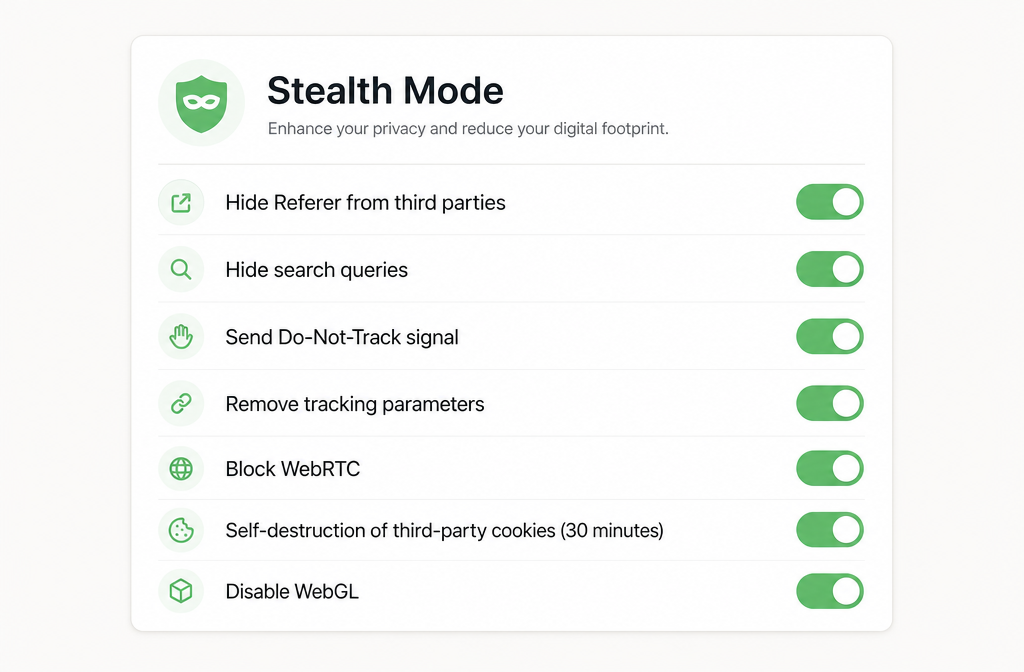
AdGuard’s Stealth Mode panel groups privacy toggles uBlock Origin doesn’t offer at all, referer hiding, tracking-parameter removal, WebRTC blocking, cookie auto-deletion.
Filtering Modes and the AdGuard Assistant
AdGuard’s settings page is more approachable than uBlock Origin’s, which matters more than purists like to admit. Filter lists are grouped into clear categories (Ad Blocking, Privacy, Social, Annoyances, Security, Other) with checkboxes and descriptions. You can see at a glance what’s enabled, when each list was last updated, and how many rules it contains.
The AdGuard Assistant is a floating on-page widget that you can summon to block any element by clicking it, the same job uBO’s element picker does, but more discoverable. Once an element is selected, a slider lets you broaden or narrow the CSS selector visually before saving the rule. For non-technical users, this is the killer feature: you don’t need to understand CSS or filter syntax to permanently hide a sticky newsletter prompt or a sidebar ad slot.
Three other features worth flagging:
- Annoyance filters kill cookie banners (the EU consent prompts), mobile app-install interstitials, social media widgets, and “Other Annoyances” like the subscribe pop-ups on Medium-style sites. Enable all four and the web becomes noticeably calmer.
- Browsing Security is AdGuard’s anti-phishing module. It sends an SHA-256 hash prefix of the URL you’re visiting to AdGuard’s reputation service to check against a malicious-domain database. This is opt-in but enabled by default on fresh installs, turn it off if you don’t want that telemetry.
- Custom filter editor with syntax highlighting, validation, and live rule testing right in the settings page. uBO has this too; AdGuard’s UI is friendlier.
Benchmark Results: Where AdGuard Lands
We ran AdGuard v5.4.3.1 (MV3, Chrome 134, fresh profile, default filters + AdGuard’s recommended additions) against the two community-standard test pages:
| Test | AdGuard (default) | AdGuard (recommended filters) | uBlock Origin (classic) | uBlock Origin Lite (Complete) |
|---|---|---|---|---|
| AdBlock Tester | 87 / 100 | 100 / 100 | 100 / 100 | 87 / 100 |
| d3ward toolz | 93% | 97% | 99% | 87% |
On AdBlock Tester with the recommended additional filters enabled (EasyPrivacy + AdGuard Tracking Protection + AdGuard Annoyances), AdGuard ties uBlock Origin at a perfect score. On d3ward, a stricter test that distinguishes between aborting a request versus returning an empty body, uBO has a slight edge because of how AdGuard handles certain blocks. In practice, no ads got through on either tool during 50 real-world page loads across news, retail, and forum sites.
Memory usage tells a different story. On a 30-tab session with the same filter sets enabled, Chrome’s task manager reported:
- uBlock Origin Lite: ~28 MB
- uBlock Origin (classic): ~85 MB
- AdGuard Browser Extension: ~110 MB
AdGuard is the heaviest of the three, largely because of the always-active Stealth Mode content scripts and the larger filter index it keeps warm. If you have an aging laptop with 8GB of RAM and dozens of tabs open, uBOL is the lighter choice. On any reasonably specced machine, the difference is invisible.
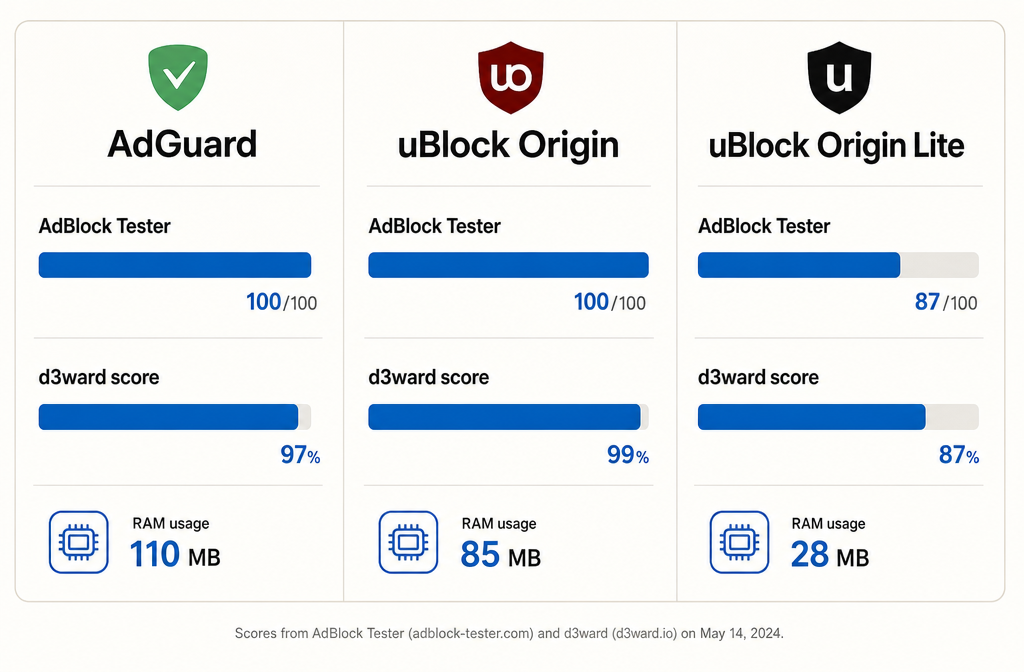
Block rates from AdBlock Tester and d3ward across the three blockers. AdGuard ties uBO with recommended filters enabled; uBOL trails in default mode.
Free Extension vs. Paid AdGuard App: The Honest Comparison
The extension is genuinely free and feature-complete for browser-only ad blocking. AdGuard’s paid app (~$2.49/month annual or ~$79.99 lifetime for a 3-device family plan) adds features the extension fundamentally cannot provide because of browser sandbox restrictions:
- System-wide blocking, ads inside other apps (Skype, the Microsoft Store, the news widget in Windows 11, games with banner ads). The extension only sees what passes through the browser.
- HTTPS filtering, the paid app installs a local certificate and decrypts TLS traffic to filter ads served from the same domain as content (the YouTube-on-mobile case). The extension is constrained to what Chrome lets it see, which since MV3 is limited to URL-pattern matching, not response-body inspection.
- DNS filtering with AdGuard DNS, a system-level DNS proxy that blocks at the resolution layer. There’s a free public AdGuard DNS at
94.140.14.14you can use independently; the paid app integrates and adds custom rules. - Parental Control, Safe Search enforcement, blocking adult content categories, time limits, password-locking the configuration.
If you only browse the web in Chrome or Firefox, the free extension covers 95% of what most people want. The paid app earns its money for households with kids, for blocking ads inside other Windows apps, or for anyone who wants DNS-layer protection on every device. AdGuard’s product-line confusion (5+ products sharing the same name) is genuinely annoying, but the extension is the right entry point and never expires into a trial.
Is Your Ad Blocker a Security Risk? (AdGuard Interview), Techlore
Installation and First-Run Configuration
The shortest path:
- Go to the Chrome Web Store listing (or the equivalent Firefox/Edge store) and click Add.
- Pin the AdGuard icon to your toolbar, by default Chrome hides it behind the puzzle-piece menu.
- Open Settings → Filters. Enable: AdGuard Base filter, EasyPrivacy, AdGuard Tracking Protection filter, AdGuard Annoyances filter, AdGuard Mobile Ads filter (if you browse responsive mobile sites on desktop).
- Open Stealth Mode and toggle on at least: Hide Referer from third parties, Hide search queries, Remove tracking parameters, Block WebRTC.
- Decide on Browsing Security. If you’re comfortable with the hashed-URL telemetry, leave it on. If not, turn it off in Settings → Security.
- Visit adblock-tester.com to confirm a 100/100 score with your chosen filter set.
Total setup time: under three minutes. The Annoyances and Tracking Protection filters are AdGuard’s own, they update on roughly weekly cadence and tend to add cookie-banner kills for whatever sites became popular that month.
Manifest V3 Limitations You Should Know About
AdGuard’s MV3 build is impressive but not magical. The same constraints that hobble uBlock Origin Lite apply here:
- 30,000 dynamic-rule budget per extension. AdGuard handles this by bundling the core filter sets as static rules (which don’t count against the budget) and reserving the dynamic budget for your custom user rules and Stealth Mode header rewrites. You’ll only hit the ceiling if you import multiple very large third-party lists into User Rules.
- Filter updates require extension store review for rules baked into the bundle. AdGuard mitigates this with a clever scheme: the extension downloads filter updates from AdGuard’s servers and applies them via the dynamic-rule API. This means new ad-server blocks can ship within hours, not days.
- No request-body inspection. Some advanced anti-anti-adblock tricks that classic uBO supports (modifying response bodies on the fly) aren’t possible in MV3. AdGuard works around this with content scripts that run after page load, but a small set of sites with active anti-adblock detection will still slip through.
- Scriptlets are more restricted. AdGuard’s scriptlet library (snippets injected into pages to neuter anti-adblock scripts) is smaller in the MV3 build than in the legacy MV2 build, though the gap shrinks with each release.
None of these is a dealbreaker for normal browsing. They matter if you’re running an aggressive setup against a site that’s deliberately fighting your ad blocker, and in that case, the recommendation is still classic uBlock Origin on Firefox.
Who AdGuard Browser Extension Is Right For
Choose AdGuard if:
- You want a single extension that does ad blocking and privacy protection without piecing together five tools
- You’re not technical enough to enjoy editing uBO’s filter list page, and you want a settings UI that explains itself
- You browse on Chrome and want a fully featured MV3 blocker (more capable than uBOL)
- You want to occasionally block page elements manually and the AdGuard Assistant’s visual workflow appeals to you
- You care about cookie-lifetime auto-deletion, tracking-parameter stripping, and DNT, and don’t want to install three more extensions to get them
Choose uBlock Origin (classic) instead if:
- You use Firefox and want the absolute best block rate with no MV3 compromises
- You’re a power user who enjoys hand-crafted filter lists and dynamic filtering rules
- You want the lowest memory footprint among full-featured blockers
- You’re philosophically opposed to any feature that calls home (AdGuard’s Browsing Security)
Choose uBlock Origin Lite if:
- You want a zero-config, zero-permissions, zero-background-process blocker that just works
- Resource use trumps every other consideration
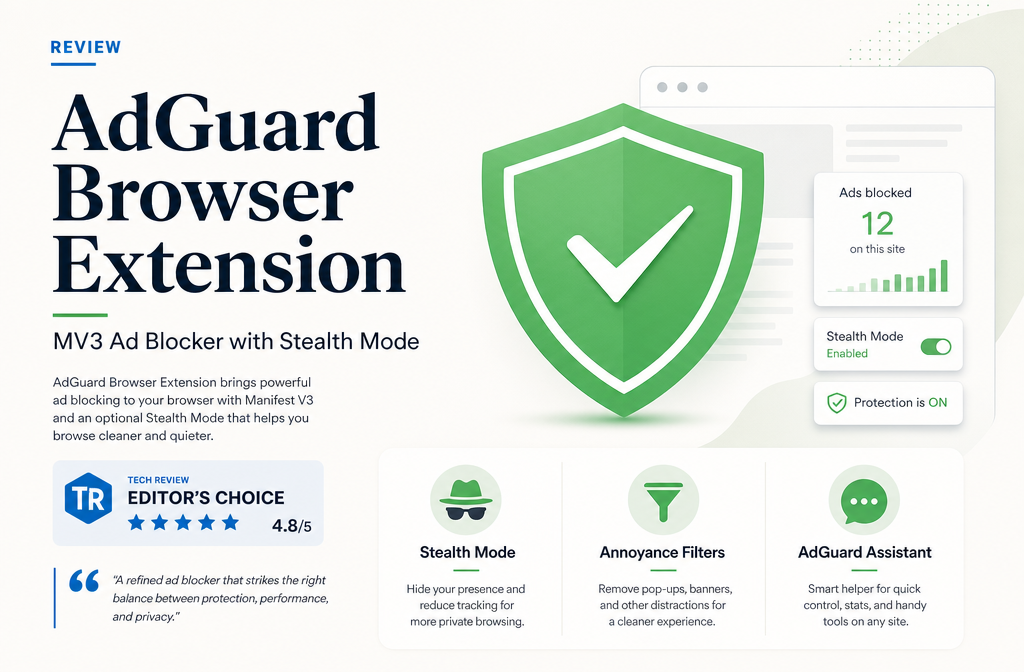
Verdict: 8.6 / 10
AdGuard’s free browser extension is the strongest argument that Manifest V3 doesn’t have to mean a worse ad blocker. By engineering around MV3’s restrictions instead of giving up on features, AdGuard ships something that genuinely beats uBlock Origin Lite on capability and beats classic uBlock Origin on user experience for non-power-users. The Stealth Mode panel alone justifies the install for anyone who cares about tracking, and the AdGuard Assistant makes element-blocking accessible to people who’d never touch a filter syntax document.
It’s not perfect. The free-versus-paid product line is needlessly confusing, the memory footprint is the heaviest of the three blockers we’ve reviewed, and the Browsing Security telemetry deserves a clearer first-run opt-in. But none of those are reasons to skip it.
For most people on Chrome in 2026, AdGuard Browser Extension is the right default. For Firefox users, classic uBlock Origin still wins. For minimalists or low-spec hardware, uBlock Origin Lite. AdGuard sits comfortably in the middle and serves a larger fraction of normal users better than either of its competitors do.