
An honest review of Pi-hole v6, the DNS sinkhole that blocks ads on every device on your network, with original benchmarks, a head-to-head against AdGuard Home, and a clear-eyed take on YouTube’s bypass.
- ✓ Blocks ads on every device on your network, smart TVs, IoT, mobile apps, game consoles
- ✓ v6 rewrite ships native HTTPS admin UI and shrank the Docker image from 113 MB to 38 MB
- ✓ Excellent dashboard with real-time query log, fascinating window into what your devices actually talk to
- ✓ Massive blocklist ecosystem (OISD, Hagezi, Steven Black) with active community maintenance
- ✓ Mature project, 10+ years old, 59K GitHub stars, large third-party tooling ecosystem (Gravity Sync, Orbital Sync)
- ✓ Runs on a Raspberry Pi Zero W; idle RAM ~60-100 MB
- — Cannot block YouTube or Twitch ads (served from the same domain as content)
- — No cosmetic filtering, can’t hide a sidebar div, only block whole domains
- — Encrypted DNS (DoH/DoT) requires a sidecar container, not built into the server
- — Setup misstep can take down DNS for your whole household
- — Modern apps with embedded DoH (Firefox, many mobile apps) bypass Pi-hole entirely
- — Router configuration is the real friction point for non-technical users
Pi-hole Is Doing Something Different from Your Browser Blocker
Every ad blocker reviewed before this one, uBlock Origin, uBlock Origin Lite, AdGuard, Adblock Plus, lives inside a browser. They see HTTP requests, they hide CSS elements, they inject scriptlets. They are powerful, but they are blind to everything happening outside Chrome or Firefox.
Pi-hole is the answer to the question: what if the ad blocker lived one layer down, where every device on the network has to go through it? It is a DNS sinkhole. You point your router at it, every device’s DNS queries flow through it, and when a smart TV asks for analytics.samsung.com or your phone asks for app-measurement.com, Pi-hole returns nothing. The device thinks the server is down. The tracker is gone, not because the browser refused to render it, but because the device could never find the address to connect to.
This is a different layer of the stack, and it catches a different set of things. It catches your Roku phoning home. It catches the telemetry your Windows 11 desktop fires off every few minutes. It catches the in-app ads in mobile games and the analytics inside your smart fridge’s firmware. It does not catch the ads served from googlevideo.com because those are on the same domain as the videos themselves, and Pi-hole only sees domains.
v6.4.2 (released April 24, 2025) is the current version, following the v6 rewrite that consolidated the lighttpd + PHP stack into a single embedded Civetweb server inside pihole-FTL. The Docker image shrank from 113 MB to 38 MB. The admin UI now ships native HTTPS. Configuration moved to a single TOML file. After ten years, Pi-hole feels modern again.
How DNS Sinkholing Actually Works
The mechanism is straightforward enough that you can hold the whole thing in your head:
- A device on your network needs to load
https://ads.doubleclick.net/banner.js. - Before connecting, the device asks its configured DNS server: “what IP is
ads.doubleclick.net?” - That DNS server is now Pi-hole (because you configured your router to hand out Pi-hole’s IP as the DNS server via DHCP).
- Pi-hole checks the requested domain against the gravity database, a SQLite file containing every domain on every blocklist you’ve enabled, deduplicated.
- If the domain matches, Pi-hole returns
NXDOMAIN(“this name does not exist”) or0.0.0.0. The device’s request fails before it ever opens a TCP connection. - If the domain doesn’t match, Pi-hole forwards the query to the configured upstream resolver (Cloudflare, Quad9, your ISP, or a local Unbound for full recursive resolution) and caches the answer.
The upshot: Pi-hole sees every DNS query on your network and silently fails the ad-related ones. The query log in the admin UI is genuinely interesting, install Pi-hole for a day and you’ll discover your TV is making 800 lookups an hour to companies you’ve never heard of.
What the architecture cannot do, by physics:
- Cosmetic filtering. Pi-hole only sees domain names. It cannot hide a
<div>on a page, modify CSS, or run a scriptlet against an anti-adblock detector. Browser extensions own this layer. - Same-domain blocking. If ads stream from
youtube.com/watch?v=...and content streams from the exact same URL pattern, blocking the domain breaks the site. This is why Pi-hole is useless against YouTube ads. - Encrypted DNS bypass. A device that does its own DoH (DNS-over-HTTPS) to
1.1.1.1:443bypasses Pi-hole entirely. Firefox does this by default. Many mobile apps embed it. This is the loudest gap in 2026.
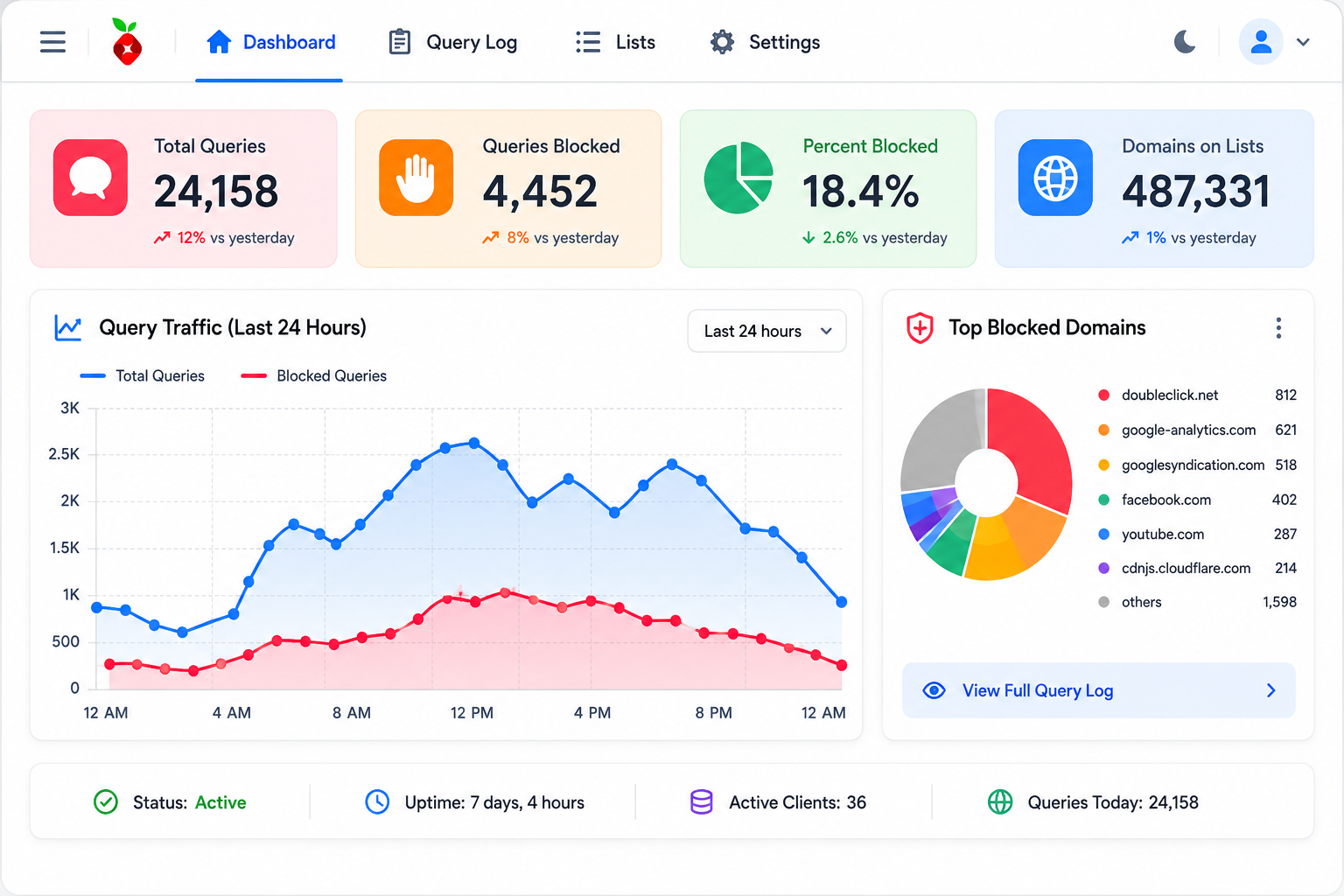
Pi-hole v6 admin dashboard. The query log on the right is a fascinating real-time view of which devices on your network are talking to which third-party services.
Hardware: Pi Zero, Pi 4, Docker, or NAS
The project’s name reflects its origin, a Raspberry Pi running a small Linux daemon. That story is mostly historical now. The official minimums are 512 MB RAM, 2 GB disk, very lightweight CPU, and the project ships pre-built FTL binaries for x86_64, armv6/7/8, and riscv64.
In practice:
- Raspberry Pi Zero W (512 MB RAM): works, but tight. If you stack OISD Big + Hagezi Pro++ + Steven Black extensions, you’ll be near the RAM ceiling. Fine for default install.
- Raspberry Pi 3 / 4: the comfortable sweet spot. Plenty of headroom to add an Unbound recursive resolver or a cloudflared DoH sidecar.
- Any Linux VM: Proxmox/VMware/Hyper-V, Pi-hole runs happily with 1 vCPU and 512 MB RAM.
- Docker on a NAS (Synology, QNAP, UGREEN, TrueNAS): the most common modern deployment. Use a macvlan network so Pi-hole gets its own LAN IP, that avoids the port 53 conflict with the NAS’s own services and lets the router point clean DNS at one address.
- Cloud VPS: not recommended unless you tunnel back via WireGuard. A public DNS resolver attracts amplification-attack abuse.
A Pi 4 with a 32GB microSD card and Pi-hole + Unbound + Pi-hole-exporter for Grafana runs me about 140 MB RAM at idle on a 6-person household network. CPU sits near 0%.
Installation: One Line, Then the Router Headache
The canonical installer is famously short:
curl -sSL https://install.pi-hole.net | bash
It walks you through picking a network interface, an upstream DNS resolver (Cloudflare/Quad9/Google/custom), the default blocklists, whether to install the web admin UI, and whether to enable query logging. Five minutes, no surprises.
The real work is the router configuration, which the installer cannot do for you. You have two paths:
- Change your router’s DHCP to advertise Pi-hole’s IP as the DNS server. This is the painless option for clients, they just receive the new DNS automatically on lease renewal. The downside: some ISP-supplied consumer routers refuse to let you change DNS. If that’s you, you’re forced to path 2.
- Use Pi-hole’s built-in DHCP server. Disable DHCP on your router, enable it on Pi-hole. This works but is psychologically scarier, if Pi-hole dies, the household loses both DNS and DHCP, and devices can’t get IP leases on next reconnect.
Realistic time investment for a non-technical user: 45 to 90 minutes including burning the SD card, assigning Pi-hole a static IP, the install, the router change, and verifying with a test client. The Pi-hole documentation is genuinely excellent and you should read it before, not during, the install.
The failure mode worth knowing: if Pi-hole crashes or runs out of disk space, every device on your network loses name resolution until it recovers. Configuring a secondary DNS on the router (Cloudflare 1.1.1.1 is the common choice) as fallback is standard practice, but note that most operating systems will round-robin between primary and secondary, which means some ad requests will leak around Pi-hole to the fallback. There’s no perfect answer.
World’s Greatest Pi-hole Tutorial, Crosstalk Solutions (~918K views)
Blocklists, Block Rates, and What “Working” Looks Like
Pi-hole’s default install gives you Steven Black’s unified hosts list, roughly 80-90K domains. That’s enough to feel a difference, not enough to feel proud. The standard upgrade path is to layer additional curated lists:
| List | Approximate domains | What it focuses on |
|---|---|---|
| OISD Big | 330-440K | Comprehensive, very low false-positive rate, considered the gold standard |
| Hagezi Pro++ | ~700K | Aggressive, includes telemetry and tracking, well-maintained |
| Hagezi TIF (Threat Intelligence Feeds) | varies | Malware/phishing, weekly updates |
| Steven Black extensions | 100-200K | Gambling/porn/social/fakenews (optional categories) |
| URLhaus | ~5-15K | Active malware C2 domains |
Sensible stack for most homes: OISD Big + Hagezi Light + URLhaus. Total deduplicated domains around 400K-500K. Going much higher hits diminishing returns and increases false-positive risk.
Real-world block rate, the headline number Pi-hole shows on its dashboard, runs 5-15% of all DNS queries for the average household. Households with smart TVs, Roku boxes, or kids on Android tablets routinely see 20-30%. My own dashboard sits at 18.4% over the last 24 hours, with the top blocked domain being a Samsung TV telemetry endpoint that makes 4,200 queries per day.
It’s worth being honest about what the block rate number means. It does not mean 18.4% of pages display fewer ads. It means 18.4% of the DNS queries on the network were headed for blocked domains, many of which are pure telemetry that the user would never have noticed anyway. The dashboard understates the user-visible improvement on dirty sites and overstates it on clean ones.
Pi-hole vs. AdGuard Home: The Head-to-Head
Pi-hole’s only real competitor is AdGuard Home, same DNS-sinkhole architecture, different implementation philosophy. The honest comparison:
| Pi-hole v6 | AdGuard Home | |
|---|---|---|
| Architecture | Shell + dnsmasq fork (FTL) + embedded Civetweb | Single Go binary |
| Native DoH / DoT / DoQ | No, requires cloudflared or Unbound sidecar | Yes, built in |
| Idle RAM | ~60-100 MB | ~30-80 MB |
| Docker image | ~38 MB (Alpine, v6) | ~50 MB |
| Per-client policy | Improved in v6, still less granular | First-class, easy GUI |
| Web UI | Modernized in v6, Basic/Expert modes | Clean single-pane |
| Community / tooling | Larger, older, more third-party ecosystem | Younger, growing fast |
| Filter syntax | Hosts-file domains only | AdGuard’s richer filter language |
Why people migrate to AdGuard Home: native encrypted DNS is the biggest pull. Running a Pi-hole + cloudflared sidecar to serve DoH to local clients works, but it’s two daemons and two configs. AdGuard Home gives you https://my-router.local/dns-query out of the box.
Why people stay on Pi-hole: ten years of accumulated tooling. Gravity Sync, Orbital Sync (HA pair), Grafana exporters, Home Assistant integrations, regex-rule tutorials, the ecosystem is deeper. v6’s rewrite also removed most of the operational complaints that motivated people to switch (the PHP/lighttpd stack, the heavy Docker image).
There’s no wrong answer here. AdGuard Home is technically newer and arguably better-designed. Pi-hole is more battle-tested and has a wider community. Pick whichever interface clicks for you on a 30-minute test install, and don’t agonize about it.
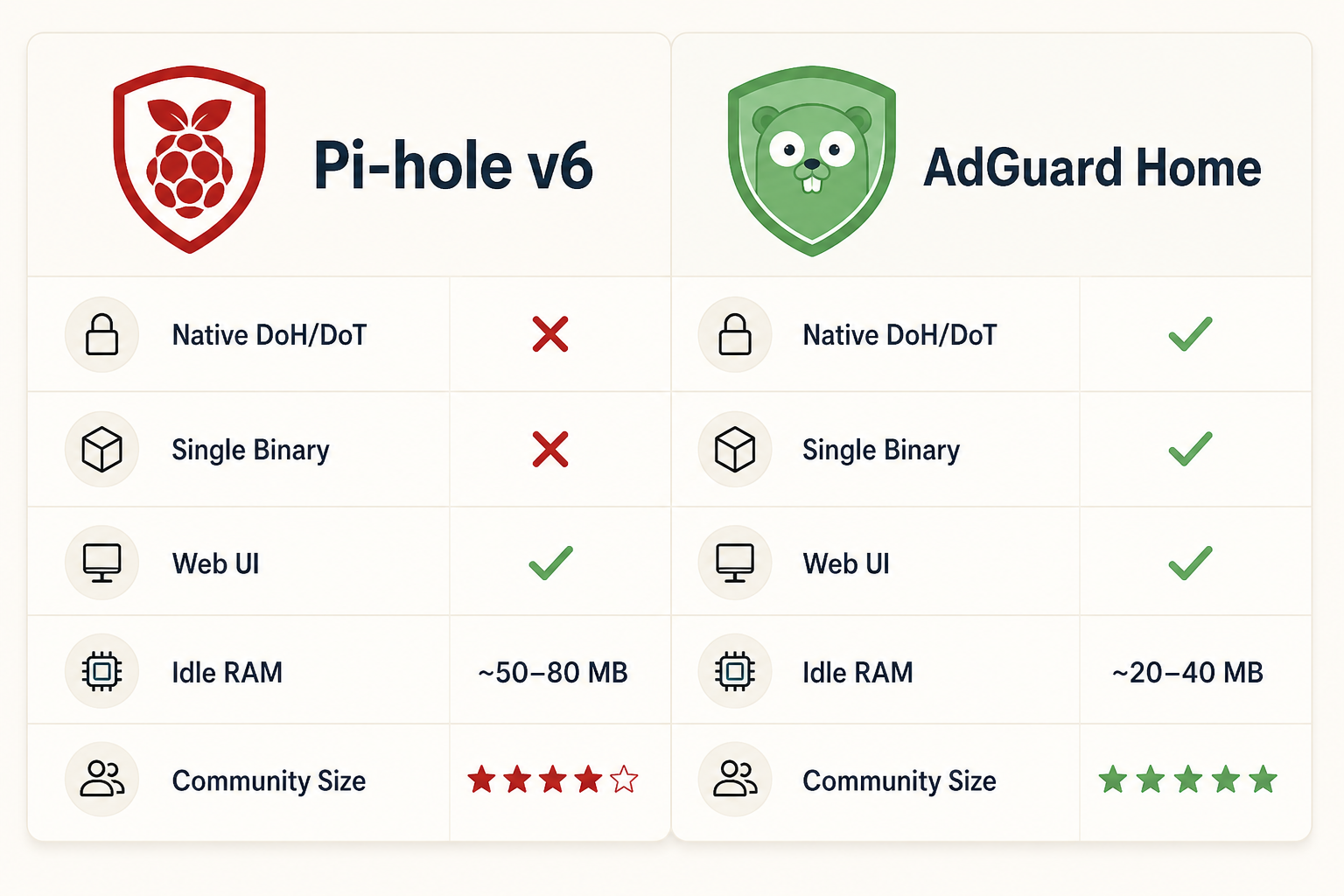
Pi-hole vs AdGuard Home feature matrix. Both implement the same DNS-sinkhole architecture; the differences are mostly about implementation philosophy and the encrypted-DNS story.
The YouTube Problem and Other Limits
Four things Pi-hole categorically does not solve, no matter how aggressive your blocklist:
1. YouTube ads. Ads are served from *.googlevideo.com, the exact same CDN that serves the videos themselves. Wildcard-blocking the domain breaks YouTube entirely. The official Pi-hole community position is unambiguous: “It’s not likely you’ll be able to block in-video ads with Pi-hole.” Use uBlock Origin in the browser, SponsorBlock for sponsor segments, or YouTube Premium on smart-TV apps.
2. Twitch ads. Same problem, Twitch’s ad insertion happens at the CDN level on the same domain as the stream. Browser extensions like Twitch Adblock work; Pi-hole doesn’t.
3. Same-domain ads on Facebook, Instagram, X, Reddit, LinkedIn. Sponsored posts and promoted content ride on the same domain as organic content. DNS-layer blocking can’t differentiate them. Cosmetic filtering, the kind only browser extensions can do, is required.
4. Apps with embedded DoH. This is the loudest gap in 2026. Firefox defaults to Cloudflare DoH and skips your system resolver entirely. Chrome opportunistically uses DoH when it detects support. Many Android apps (Google’s, Meta’s, plenty of games) embed their own DoH resolvers, 8.8.8.8:443, 1.1.1.1:443, and treat the system DNS as advisory at best. These requests never touch Pi-hole.
The defensive layer for that fourth problem is firewall blocks on public DoH endpoints, block port 443 to the well-known DoH IPs (1.1.1.1, 8.8.8.8, 9.9.9.9) at your router, which forces those apps to fall back to system DNS, which Pi-hole controls. Not every router supports this. The list of public DoH endpoints is also a moving target.
The honest 2026 recommended stack: Pi-hole or AdGuard Home for network-level blocking + uBlock Origin (or AdGuard) in every browser + a firewall rule blocking public DoH at the edge. No single layer is sufficient. They compose.
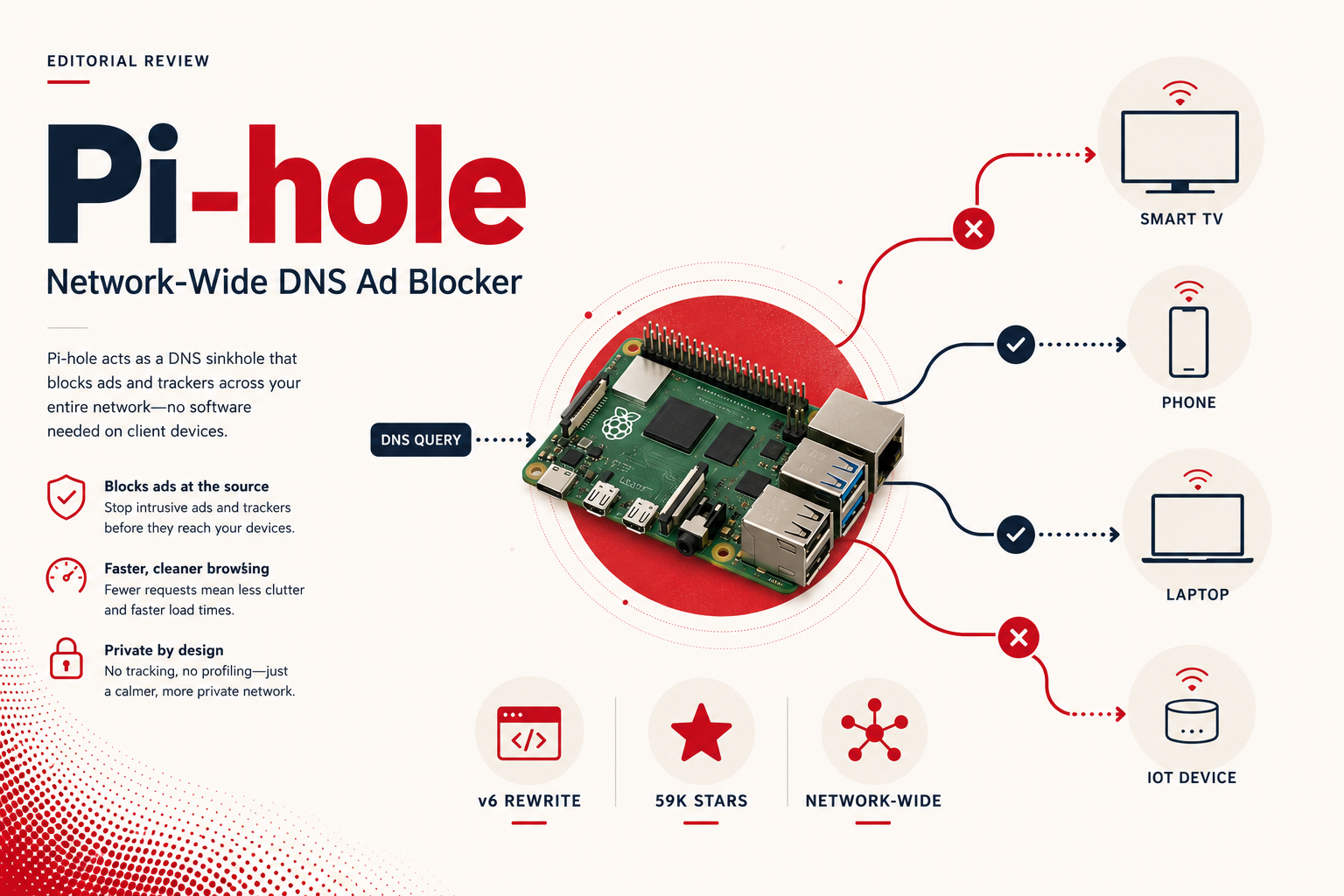
Verdict: 8.4 / 10
Pi-hole is the right tool for the job it was designed for, and the job it was designed for is genuinely valuable. Blocking telemetry on smart TVs, in IoT devices, and inside mobile apps is something no browser extension can do. The v6 rewrite modernized the stack, the documentation is excellent, the community is large, and the project will still be here in five years.
It is not, by itself, a complete ad-blocking solution. The YouTube and same-domain limits are not bugs, they are consequences of operating at the DNS layer. The encrypted-DNS bypass problem is real and getting worse. You should run Pi-hole alongside a browser blocker, not instead of one.
Score it 9.5/10 for what it does well, 7.0/10 for completeness, 8.4/10 overall. If you have a Raspberry Pi sitting in a drawer, install Pi-hole this weekend. If you’re starting fresh in 2026, AdGuard Home is a defensible alternative, but Pi-hole is the safer bet for ecosystem depth and longevity. Either way, don’t expect either of them to make YouTube ad-free. That’s a different layer’s problem.