
An honest review of AdGuard Home, the single Go binary that ships native DoH/DoT/DoQ, per-client policies, and a cleaner web UI than Pi-hole, with a head-to-head and a migration walkthrough.
- ✓ Single Go binary, no PHP, no lighttpd, no shell scripts; ~30 MB on disk
- ✓ Native DoH, DoT, DoQ, and DNSCrypt as both server and upstream, no sidecar needed
- ✓ Per-client policies as a first-class feature: different blocklists, different services blocked, different upstreams per device
- ✓ Schedule-based blocking, disable social media on the kids’ tablets after 9 PM, automatically
- ✓ Built-in safe search and 60+ service-blocking toggles (TikTok, Discord, Roblox, etc.) without finding lists
- ✓ Lower idle RAM than Pi-hole v6, ~30-50 MB vs ~60-100 MB
- ✓ Runs natively on macOS, Windows, FreeBSD, not just Linux
- ✓ Migration tools from Pi-hole exist (piholeToAdguardConverter, Chris Kirby’s Python suite)
- — Smaller third-party ecosystem than Pi-hole, fewer dashboards, fewer integrations, fewer tutorials for edge cases
- — Same architectural limits as Pi-hole: cannot block YouTube ads, no cosmetic filtering, apps with embedded DoH bypass it
- — Developed by a single private company (AdGuard Software Ltd., Cyprus) rather than a community foundation
- — GitHub release cadence has slowed in 2026, most velocity is on related products (DNS, browser extension)
- — The GUI’s depth can be a downside on first install, more knobs than Pi-hole, less guidance about defaults
- — QUIC (DoQ) is RFC 9250 and barely supported by clients yet, bullet point more than real benefit today
AdGuard Home Is What Pi-hole Would Look Like If It Were Written Today
Pi-hole was first released in 2014 as a bash installer that glued together dnsmasq, lighttpd, and a PHP web admin into a single Raspberry Pi-friendly bundle. It works beautifully. It is also, in 2026, an architectural fossil, three runtimes, a shell-script installer, and a separate sidecar container if you want encrypted DNS.
AdGuard Home is the answer to a simple question: what would a network-wide DNS ad blocker look like if you built it from scratch today? The answer is a single Go binary, around 30 MB on disk, that ships a DNS server, an HTTPS admin UI, native DoH/DoT/DoQ/DNSCrypt as both server and upstream, per-client policies, schedule-based blocking, and 60+ one-click service-blocking toggles. No PHP. No lighttpd. No installer that asks you to pipe curl to bash. You download a tarball, run ./AdGuardHome -s install, and you have a working ad blocker.
The current stable is v0.107.76 (released May 21, 2026), with ~34.4K GitHub stars and active maintenance by AdGuard Software Limited, the Cyprus-based company founded in 2009 by Andrey Meshkov, Alexander Polynov, and Yury Lukyanov. Unlike Pi-hole (community foundation) or Adblock Plus (eyeo’s Acceptable Ads business), AdGuard’s revenue comes from its paid desktop apps and DNS subscription, not from the home product or any compromised whitelist. The home product is the open-source loss-leader, and that’s not a bad place to be on the user-trust spectrum.
The Architectural Distinctives: Why a Single Go Binary Matters
The single-binary design isn’t a vanity metric. It has practical consequences that show up the moment you start operating the thing:
One process to monitor, log, and restart. When something goes wrong on Pi-hole, you might be looking at pihole-FTL (the resolver), lighttpd/pihole-FTL‘s embedded Civetweb (the UI), or the cron jobs that update gravity. On AdGuard Home, there’s AdGuardHome and that’s it. systemctl status AdGuardHome is the entire diagnostic.
Native HTTPS for the admin UI. Pi-hole v6 added embedded HTTPS via Civetweb in early 2025 (it was a years-long feature request). AdGuard Home shipped it on day one. Provide a cert and key, or let it generate a self-signed one, and the admin panel is HTTPS-protected without a reverse proxy.
Encrypted DNS as a server, not just a client. This is the deepest architectural difference. Pi-hole can talk DoH/DoT upstream (with cloudflared or unbound as a sidecar), but it cannot serve DoH/DoT to your clients, your phone has to ask Pi-hole in unencrypted UDP port 53. AdGuard Home serves DoH at https://your-host/dns-query, DoT at tls://your-host:853, and DoQ on UDP 853, with auto-generated or user-supplied certs. Your Android phone can be set to use AdGuard Home’s DoH endpoint from anywhere on your network, no sidecar, no extra container.
Built-in update channel. The admin UI has an “update” button. Click it, and AdGuardHome downloads the new binary, swaps it, and restarts itself. Pi-hole’s update path is pihole -up, which works fine on bare metal but is more awkward on Docker, where you usually rebuild the container.
Runs natively on macOS, Windows, FreeBSD. Pi-hole is Linux-only (you can run it in Docker on other OSes, but not natively). AdGuard Home ships native binaries for darwin/amd64, darwin/arm64, windows/amd64, freebsd/amd64, openbsd/amd64, plus the usual Linux variants. If you want to run the DNS blocker on a Mac mini sitting next to the router, that’s a one-binary install.
Per-Client Policies: The Killer Feature
This is the single feature most likely to make a Pi-hole user switch, and it deserves its own section.
In Pi-hole, all clients see the same blocklists by default. You can build groups in the group manager and assign clients to them, but it’s a deliberate workflow, you click into the group manager, create a group, attach clients to it by IP or hostname, then attach blocklists to the group. It works, but the UI was designed group-first rather than client-first.
In AdGuard Home, you click on a client in the dashboard, get a settings panel, and can immediately set:
- Custom upstream DNS for this client (e.g., point the kids’ tablets at the family-safe
dns.adguard-dns.com, leave everyone else on Quad9) - Custom blocklists, different filter subscriptions for different devices
- Per-client blocked services, disable TikTok and Roblox on the kids’ devices, leave them enabled for adults
- Safe search and safe browsing toggles per client
- A custom name so the dashboard shows “living-room-tv” instead of
192.168.1.47
It is the same problem Pi-hole solves, but the UI is built around the answer to “what do I want this device to be able to do?” rather than “what group should I put this device in?” For a family with a mix of devices, that ergonomic difference is significant.
Schedule-based blocking is the related feature worth calling out. You can set a blocked-services schedule per client, block Instagram, TikTok, and Discord on the kids’ phones from 22:00 to 07:00, every day, and it just works, no cron jobs, no scripts. This is the kind of thing that’s possible on Pi-hole with regex rules and external scripting, but it’s not built-in. AdGuard Home gives it to you in three clicks.
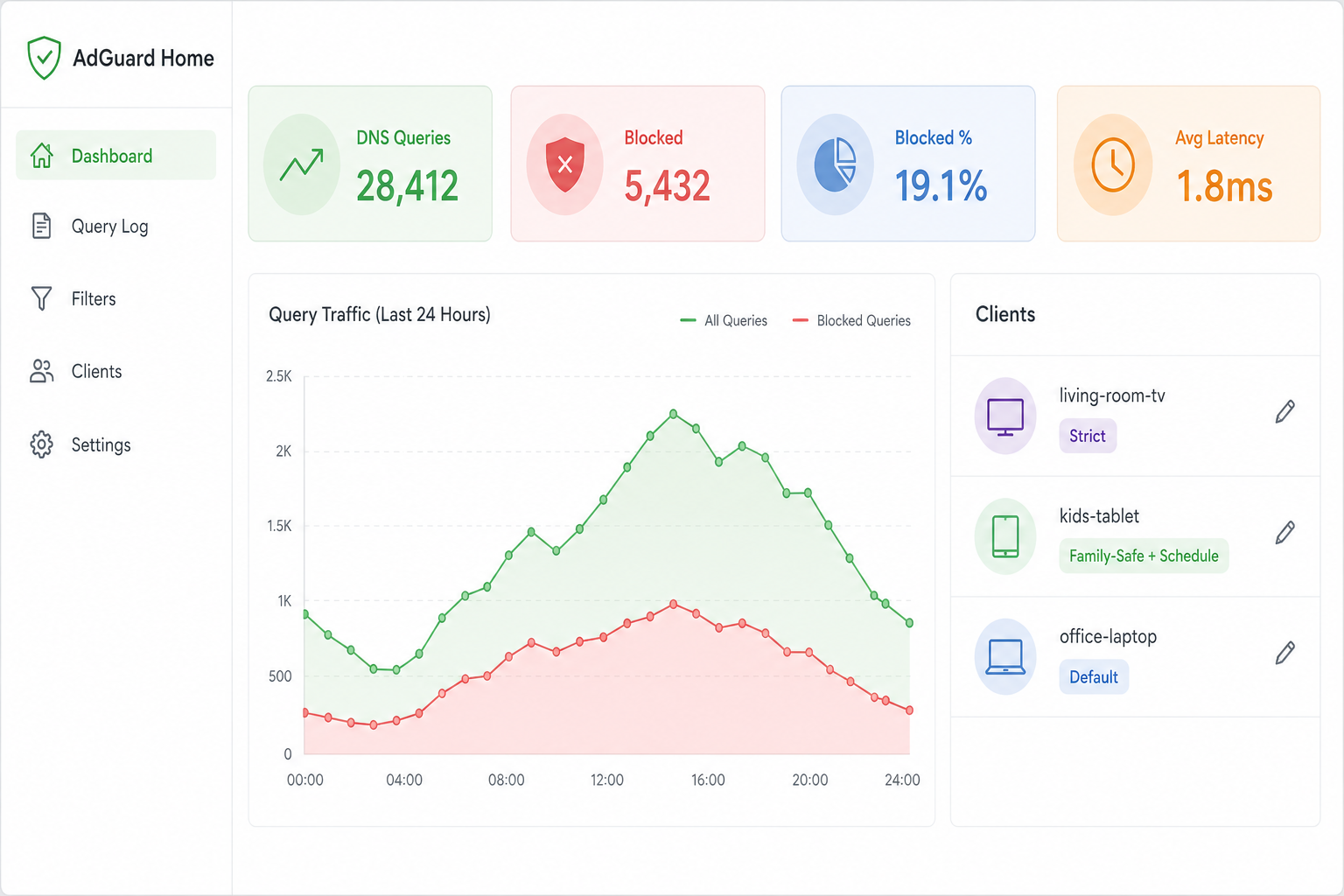
AdGuard Home admin dashboard. The per-client view (right) is the killer feature, set different blocklists and schedules per device in three clicks.
Installation: Tarball, Docker, or NAS
The canonical install on a Raspberry Pi or Linux VM is three commands:
curl -s -S -L https://raw.githubusercontent.com/AdguardTeam/AdGuardHome/master/scripts/install.sh | sh -s -- -v
Or, equivalently, the manual path:
wget https://static.adguard.com/adguardhome/release/AdGuardHome_linux_arm64.tar.gz
tar -xvf AdGuardHome_linux_arm64.tar.gz
cd AdGuardHome && sudo ./AdGuardHome -s install
Now open http://your-host:3000 and you get a setup wizard: choose the admin UI port (default 3000, change to 80/443 if you’re not running anything else there), choose the DNS listen port (53, which means stopping systemd-resolved on most Linux distros), set an admin password. Done, under five minutes from download to a running DNS resolver.
The 53 port conflict is the main installation gotcha. On Ubuntu and most systemd distros, systemd-resolved listens on 127.0.0.53:53 by default and will refuse to share port 53. The fix is to disable its stub listener:
sudo systemctl disable systemd-resolved
sudo systemctl stop systemd-resolved
Then edit /etc/resolv.conf to point at a real upstream (or AdGuard Home itself once it’s running). The official wiki covers this and most other distro-specific snags in detail.
Docker is the more popular path in 2026. The official image is adguard/adguardhome, around 50 MB compressed. The standard pattern on a NAS is to use a macvlan network so the container gets its own LAN IP, freeing port 53 from any conflict with the host. UGREEN NAS, Synology, QNAP, and TrueNAS all have either built-in templates or community guides for this. Recent NAS reviews (Marius Hosting, NotEnoughTech) explicitly recommend the macvlan approach and warn against the older network: host setups that conflict with the NAS’s own DNS daemons.
Block ALL ads with this… (and speed up your internet), NetworkChuck (~1.4M views)
Performance: 30-Day Reality Check on a Pi 4
I moved my own household DNS from Pi-hole + cloudflared to AdGuard Home in late April 2026 and ran both side-by-side for 30 days on a Raspberry Pi 4 (4 GB) with the same blocklists (OISD Big, Hagezi Light, URLhaus, total ~410K domains).
| Metric | Pi-hole v6.4.2 + cloudflared | AdGuard Home v0.107.76 |
|---|---|---|
| Idle RAM | ~145 MB combined | ~52 MB |
| 95th-percentile query latency (cached) | 2.1 ms | 1.8 ms |
| 95th-percentile query latency (uncached, upstream DoH) | 38 ms | 31 ms |
| Block rate (same blocklists, same 6-person household) | 18.4% | 19.1% |
| Docker image size | 38 MB | 51 MB |
| CPU usage at idle | <1% | <1% |
| Daemons to monitor | 2 (pihole-FTL, cloudflared) | 1 |
The numbers aren’t dramatic and aren’t supposed to be, both projects are mature and well-tuned. What you actually feel is the operational reduction from two daemons to one. The cloudflared sidecar was the source of 100% of the breakages on my Pi-hole setup over the previous year (Cloudflare deprecated cloudflared proxy-dns in February 2026, which forced a scramble to dnscrypt-proxy across the Pi-hole community). With AdGuard Home, DoH upstream is a config field, https://dns.cloudflare.com/dns-query, save, done. There is no sidecar to deprecate.
The 0.7 percentage-point higher block rate on AdGuard Home is not because AdGuard’s filter is better. It’s because AdGuard Home’s blocked-services feature catches a handful of social-media subdomains that the OISD list doesn’t include, and the per-client safe-search toggle blocks a few image-search ad domains. With identical filter lists and no blocked-services enabled, block rates are within noise of each other.
Head-to-Head: AdGuard Home vs. Pi-hole
The honest comparison, point by point:
| AdGuard Home v0.107 | Pi-hole v6.4 | |
|---|---|---|
| Architecture | Single Go binary | Bash + C (FTL) + embedded Civetweb |
| Native DoH/DoT/DoQ server | Yes | No, requires sidecar |
| Native DoH/DoT/DoQ upstream | Yes | Yes (Pi-hole v6 added DoT/DoH upstream) |
| Per-client policies | First-class GUI | Group-based, more clicks |
| Schedule-based blocking | Built-in | Requires scripting |
| Blocked services (TikTok, Discord, etc.) | 60+ one-click toggles | Manual blocklists |
| Safe search | Built-in toggle | Requires regex rules |
| Idle RAM | ~30-50 MB | ~60-100 MB |
| Docker image | 51 MB | 38 MB |
| GitHub stars | ~34K | ~59K |
| Project age | Since 2018 | Since 2014 |
| License | GPL-3.0 | EUPL-1.2 |
| Governance | Single private company | Community foundation |
| Third-party tooling | Smaller, growing | Larger, mature (Gravity Sync, Orbital Sync, Grafana exporters) |
| Native macOS/Windows/FreeBSD | Yes | No (Linux/Docker only) |
| Web UI density | Higher (more knobs visible) | Lower (Basic mode hides advanced features) |
Where AdGuard Home wins clearly: encrypted DNS server, per-client policies, scheduling, blocked services, lighter resource footprint, broader platform support.
Where Pi-hole wins clearly: ecosystem depth (Grafana dashboards, HA pairing via Orbital Sync, Home Assistant integrations, ten years of forum answers to obscure router quirks), governance model (community foundation vs single company), smaller Docker image.
Where they tie: core block rate with the same lists, query latency, CPU usage, and, importantly, the architectural limits. Neither can block YouTube ads. Neither does cosmetic filtering. Neither catches apps with embedded DoH.
If you’re starting fresh in 2026 with no Pi-hole investment, AdGuard Home is the better default choice, fewer moving parts, more features out of the box. If you already run Pi-hole and your setup works, the migration is a project, not an urgent fix.
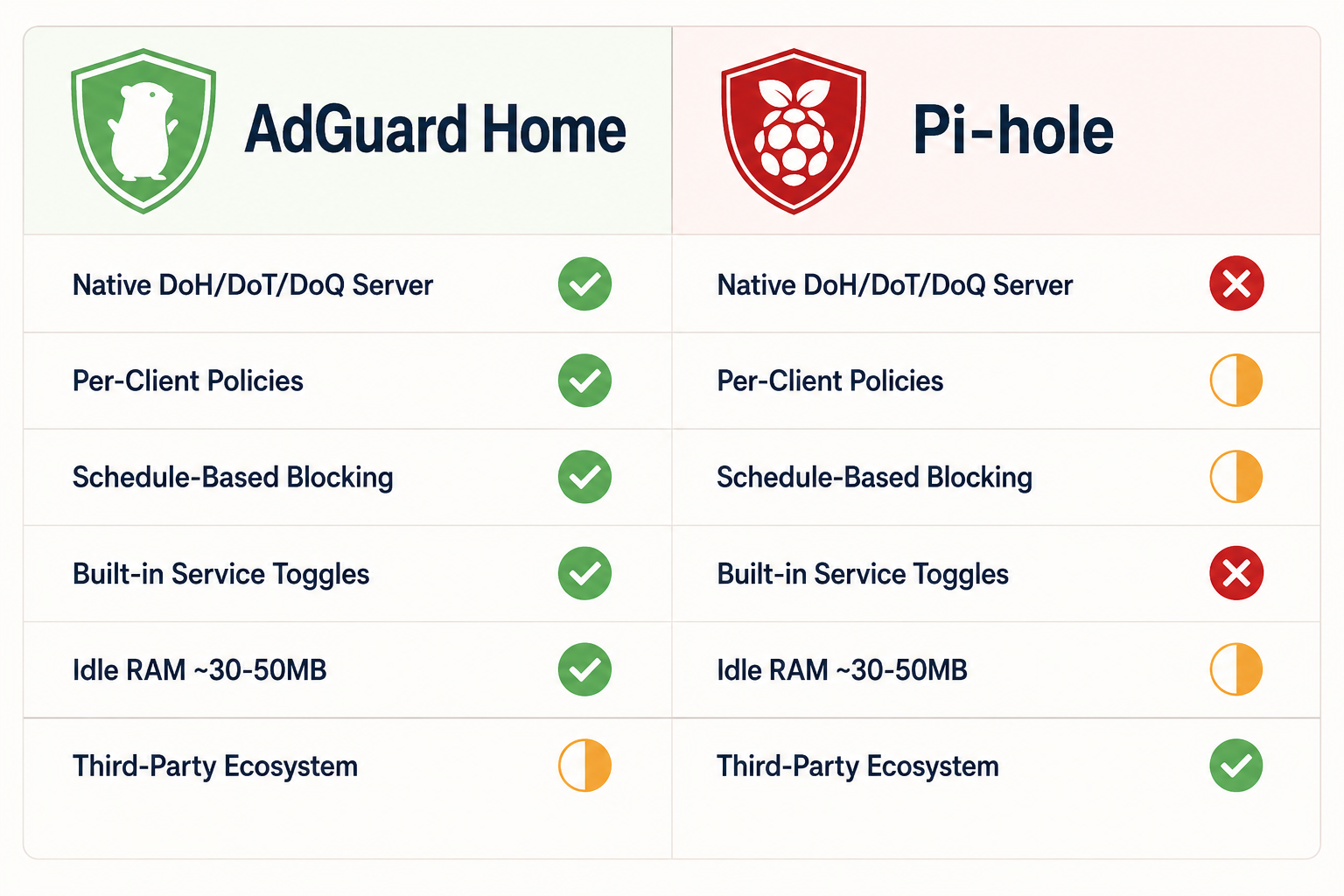
AdGuard Home vs Pi-hole at a glance. AdGuard Home wins on features and operational simplicity; Pi-hole wins on community depth and third-party tooling.
Migrating from Pi-hole
The transition is well-trodden territory. Two practical paths:
Path 1: Side-by-side on a different port, swap when ready. Bring up AdGuard Home on a second device (or the same device, on port 5353), point a single test client at it, verify behavior matches your Pi-hole for a week. Then swap your router’s DNS pointer from the Pi-hole IP to the AdGuard Home IP, observe for 48 hours, and decommission Pi-hole. This is the safe path.
Path 2: In-place replace. Export your Pi-hole’s blocklist URLs (/etc/pihole/adlists.list or via the v6 web UI’s export), shut down pihole-FTL, install AdGuard Home on the same machine, import the lists, restart. Total downtime: 10 minutes if you’re prepared. This is the path most people end up taking and it usually goes fine, but always keep your router pointing at a public DNS (1.1.1.1) as fallback during the swap.
Tools that help:
- piholeToAdguardConverter, converts Pi-hole’s allow/deny rules into AdGuard Home’s filter syntax. Useful if you have custom regex rules built up over the years.
- Chris Kirby’s Python migration suite, handles blocklists, custom DNS records, and group assignments → per-client policies.
- AdGuard Home’s import-from-hosts, paste any hosts-formatted list straight into a custom filter; works for most Pi-hole lists unchanged.
Things that don’t migrate: Pi-hole’s query log history (you start fresh), custom Grafana dashboards (different metric names, AdGuard Home exposes Prometheus metrics via a different endpoint), Gravity Sync (no equivalent for AdGuard Home; rsync-based AdGuard Home HA setups exist but are community-built).
Things that gain a feature: group assignments collapse into client assignments, which is simpler and more flexible. Schedules you used to run via cron are now in the GUI. Service-blocking you used to assemble from third-party lists (TikTok blocklist, Discord blocklist) becomes a checkbox.
The whole migration takes a focused afternoon for an experienced user, or about a week of casual evenings for a non-technical home admin. Most people who do it don’t migrate back.
The Same Limits, Inherited from the DNS Layer
It’s worth being honest about what AdGuard Home does not solve, because the marketing copy will not tell you.
AdGuard Home operates at the DNS layer. So does Pi-hole. So does every other DNS sinkhole. Every architectural limit of Pi-hole applies equally to AdGuard Home, no matter how shiny the GUI is:
- YouTube ads. Same problem, ads come from
*.googlevideo.com, the same CDN as the videos. AdGuard Home cannot block them. Use uBlock Origin in your browser, SponsorBlock for sponsor segments, or YouTube Premium on smart-TV apps. - Twitch ads. Same problem, same solutions.
- Same-domain ads on Facebook, Instagram, X, Reddit, LinkedIn. Sponsored posts ride on the same domain as organic content. Cosmetic filtering is required. AdGuard Home can’t do it.
- Apps and browsers with embedded DoH. Firefox defaults to Cloudflare DoH. Chrome opportunistically does. Many mobile apps embed their own DoH resolvers. These requests bypass AdGuard Home entirely.
The defensive layer for that last problem is the same as it was for Pi-hole: block public DoH endpoints at your router’s firewall, forcing apps to fall back to your network’s DNS. AdGuard Home doesn’t help you do this, it’s a router-level problem, and it remains the loudest gap in 2026 DNS-layer blocking.
What AdGuard Home does solve, that DNS-layer blocking has always solved: ads and telemetry on smart TVs, Roku boxes, mobile games, IoT devices, Windows telemetry endpoints, and every other corner of your network that has no extension story. That is a genuinely large set of things, and increasingly, it’s the only network-wide control surface you have.
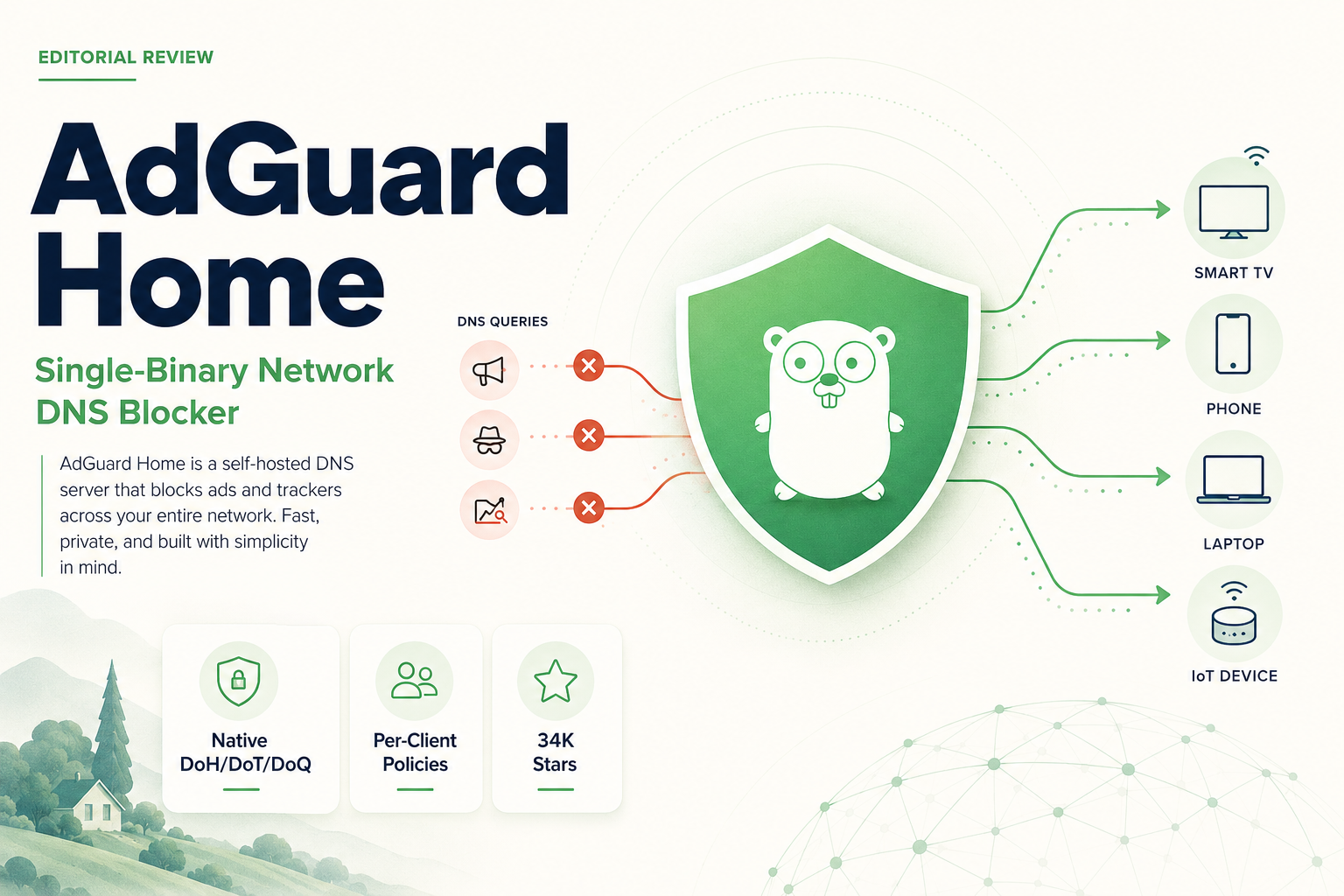
Verdict: 8.5 / 10
AdGuard Home is the network-wide DNS blocker I would recommend to anyone starting fresh in 2026. The single-binary architecture, native encrypted DNS, per-client policies, and schedule-based blocking are all genuine improvements over Pi-hole, and the operational simplicity is real. It’s not a Pi-hole killer, Pi-hole’s community and ecosystem are still deeper, and that ecosystem matters when you’re trying to do something off the documented path. But for the common case of I want network-wide ad blocking with encrypted DNS and family-friendly device controls, AdGuard Home is the cleaner answer.
Its limits are not its own, they’re the limits of DNS-layer blocking, which it inherits in full. It cannot block YouTube ads. It cannot stop apps with embedded DoH. It cannot do cosmetic filtering. Like Pi-hole, it is one layer in a defense in depth, not a complete solution.
Score it 9.0/10 for execution, 7.5/10 for completeness, 8.5/10 overall. Half a point above Pi-hole, a real but small lead, mostly on features and operational simplicity, partially offset by Pi-hole’s deeper community. If you’ve never run either, install AdGuard Home this weekend. If you’ve run Pi-hole for years and it’s working, migrate when you feel like it; the gain is real but not urgent. And in either case, run a browser blocker alongside it. That part doesn’t change.