Gluetun routes every Docker container through a single VPN tunnel. Learn how it works, what it costs, and whether it fits your self-hosted stack.
What is Gluetun?
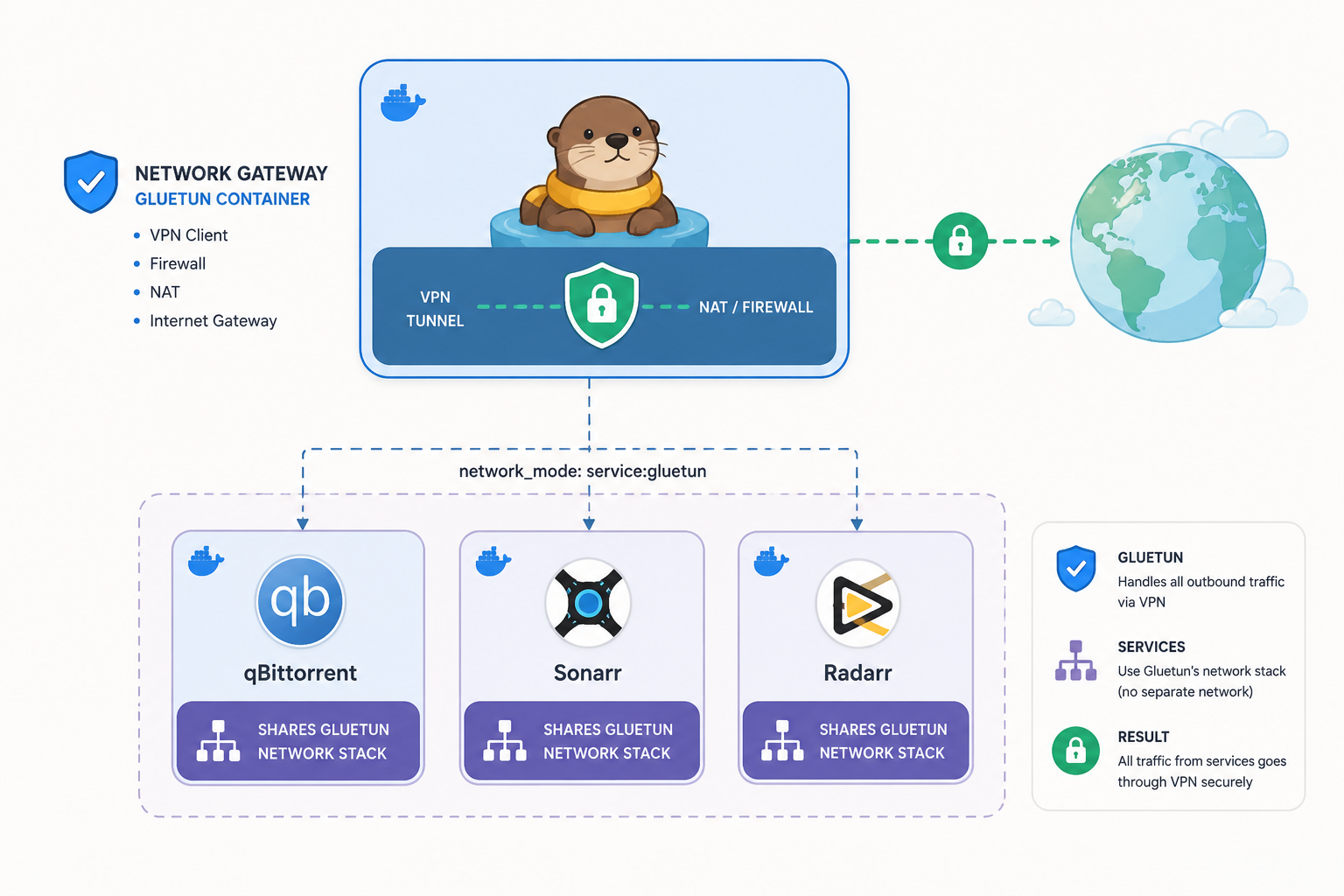
Gluetun is a lightweight Go-based Docker container that runs a VPN client – WireGuard or OpenVPN, and exposes its network namespace to other containers on your host. That last part is the whole point. Instead of installing a VPN client inside qBittorrent, another one inside Sonarr, and praying both stay in sync, you run one Gluetun container and point everything else at it.
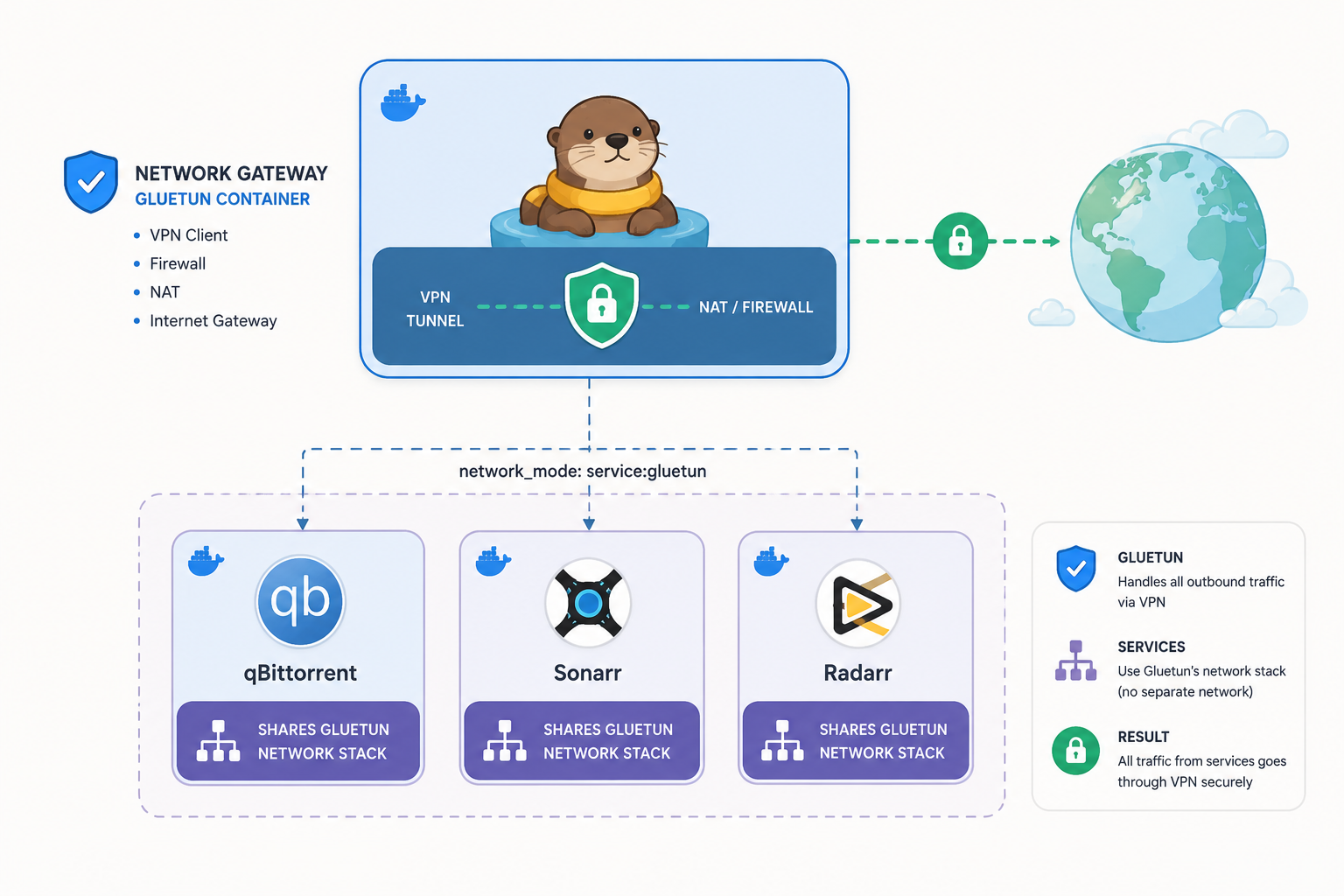
The mechanic is network_mode: service:gluetun. When you set this on another container, Docker skips creating a separate network stack for it and instead binds it to Gluetun’s. The container has no IP, no routes, no DNS of its own – it inherits Gluetun’s. If the tunnel drops, Gluetun’s kill switch blocks outbound traffic, so the attached containers cannot leak to your home IP. There is no fallback to the host network.
That centralization is what separates Gluetun from per-app VPN features like qBittorrent’s built-in client. Credentials, server rotation, leak protection, and DNS over TLS all live in one place.
services:
  gluetun:
    image: qmcgaw/gluetun:latest
    cap_add: [NET_ADMIN]
    environment:
      VPN_SERVICE_PROVIDER: mullvad
      VPN_TYPE: wireguard
      WIREGUARD_PRIVATE_KEY: your_key
    ports:
      - 8080:8080

  qbittorrent:
    image: lscr.io/linuxserver/qbittorrent
    network_mode: "service:gluetun"
    depends_on: [gluetun]
WireGuard is faster and the default recommendation; OpenVPN exists for providers that have not rolled out WireGuard yet.
Gluetun Features Worth Knowing
Here’s what actually matters once you wire Gluetun into a real stack, and where this Gluetun review gets opinionated about the trade-offs.
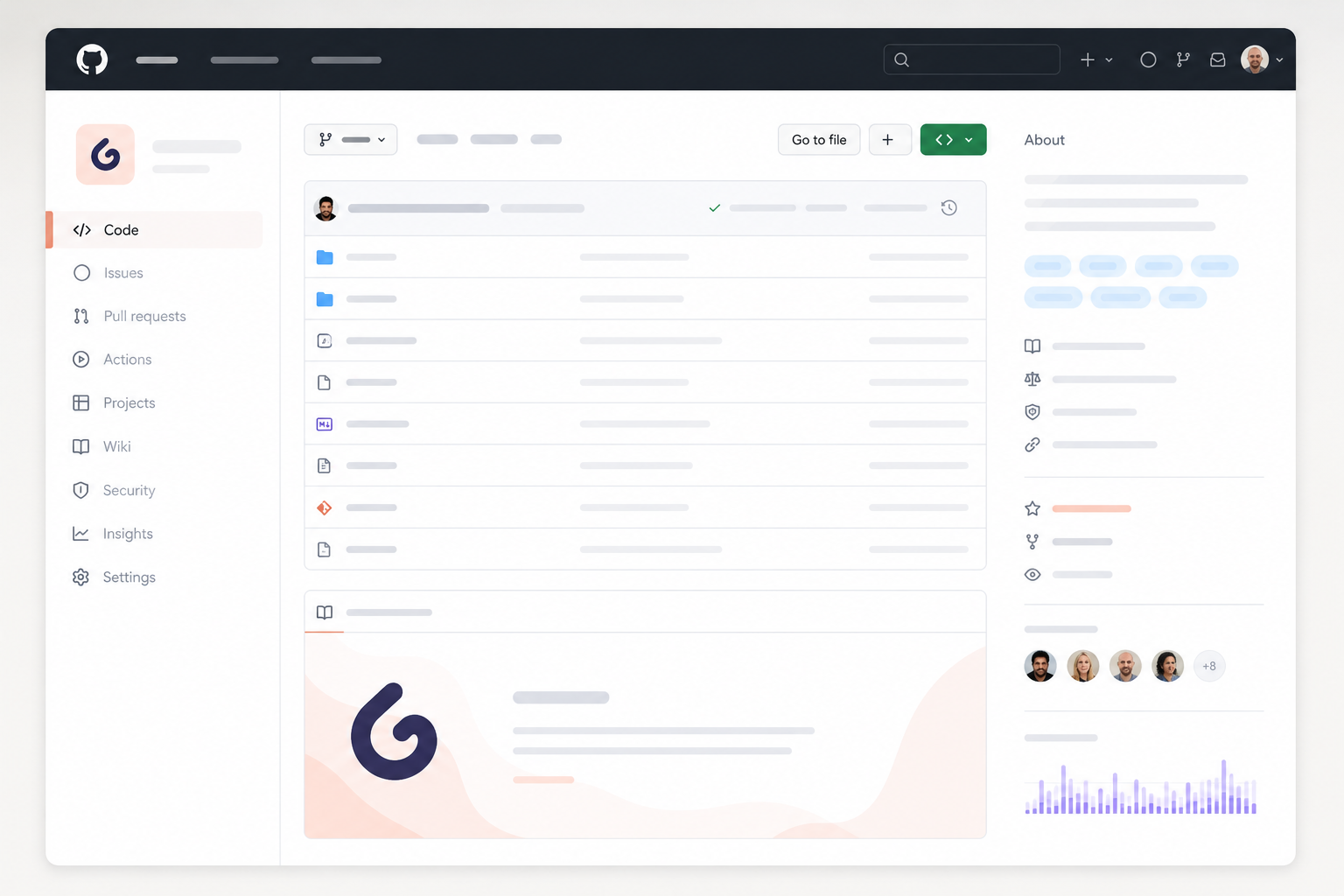
Full feature docs live in the official Gluetun wiki if you want more than the highlights below.
Kill Switch Behavior
When the tunnel drops, Gluetun blocks outbound traffic with firewall rules inside the container’s network namespace. Any container attached via network_mode: service:gluetun loses internet until the tunnel comes back – no fallback to your host IP, no leak window. For a qBittorrent or Deluge stack this is the whole point: your client physically cannot reach a tracker without the VPN.
WireGuard vs OpenVPN: Which to Pick
Pick WireGuard. It’s 2-3x faster on gigabit links, adds 10-30ms less latency, recovers from sleep and network changes instantly, and uses a fraction of the CPU on a Raspberry Pi 4 or low-power NAS.
Use OpenVPN only when WireGuard isn’t an option – some providers gate it behind newer plans, or your network blocks UDP and you need OpenVPN over TCP/443 to get out. For 95% of self-hosters on Mullvad, PIA, or ProtonVPN, WireGuard is the answer.
DNS over TLS
A DNS leak looks like this: your VPN tunnel is up, your public IP checks out, but the DNS lookup for tracker.example.com goes to your ISP’s resolver in plaintext on port 53. Your ISP now has a log of every domain you visited, VPN or not. App-level VPN clients in qBittorrent don’t fix this – they tunnel TCP traffic but leave DNS to the OS.
Gluetun runs its own DNS over TLS resolver pointing at Cloudflare with Quad9 fallback (configurable via DOT_PROVIDERS). Every query from every attached container is encrypted on port 853 before it leaves the namespace. Your ISP sees one TLS connection to 1.1.1.1, not a list of domains.
Built-in HTTP and SOCKS5 Proxies
Gluetun exposes an HTTP proxy on port 8888 and a Shadowsocks endpoint on port 8388. Use these instead of network_mode: service:gluetun when you can’t share a network namespace:
- Non-Docker apps: a Plex agent, a CLI scraper, or a script on another machine sets
HTTP_PROXY=http://gluetun-host:8888and inherits VPN routing without containerization. - Browser traffic: point Firefox or a SwitchyOmega profile at
http://docker-host:8888to send specific tabs through the VPN without touching your OS network stack. - Mobile devices: phones running a Shadowsocks client connect to port 8388 to tunnel through your home VPN exit.
It’s not as airtight as namespace sharing – a misbehaving app can ignore proxy settings and leak DNS, but it’s the right tool when network_mode isn’t available.
Control Server REST API
Gluetun runs a control server on port 8000 that does more than most people realize. You can switch servers at runtime without restarting the container, check status, and – critically for torrent users – query the forwarded port:
# Current public IP
curl http://localhost:8000/v1/publicip/ip

# PIA/ProtonVPN forwarded port (for qBittorrent listen port)
curl http://localhost:8000/v1/openvpn/portforwarded

# Switch to a Switzerland server without restarting the container
curl -X PUT http://localhost:8000/v1/openvpn/settings \
  -H "Content-Type: application/json" \
  -d '{"server_countries":["Switzerland"]}'
That PUT request swaps exit nodes in seconds – no container restart, no downtime for the *arr stack hanging off it. The /v1/openvpn/portforwarded endpoint is the cleanest way to keep qBittorrent’s listen port in sync with whatever port your provider assigned this session; a cron job polling every 5 minutes is enough. Polling /v1/publicip/ip from Uptime Kuma gives you a real “am I leaking” signal instead of just “the container is up.”
Supported VPN Providers
| Provider | WireGuard | OpenVPN | Notes |
|---|---|---|---|
| Mullvad | Yes | Yes | Best WireGuard support; uses account number, no password |
| ProtonVPN | Yes | Yes | Requires manual WireGuard config export |
| Private Internet Access | Yes | Yes | Native port forwarding support |
| NordVPN | Yes (NordLynx) | Yes | Requires access token |
| Surfshark | Yes | Yes | Standard credential setup |
| Windscribe | No | Yes | OpenVPN only |
| Custom/Generic | Yes | Yes | Bring your own config |
If your provider is on this list and supports WireGuard, you’re going to have a good time. The full matrix with per-provider environment variables is in the Gluetun provider setup wiki.
Pricing
Gluetun itself costs nothing. It’s MIT-licensed, self-hosted, and the project has zero paid tiers, zero telemetry, and zero upsells. Your only real cost is the VPN subscription you point it at. Resource overhead is negligible too – expect under 50MB RAM at idle on your Docker host.
| Component | Cost | Notes |
|---|---|---|
| Gluetun | Free | Open source, MIT license, self-hosted |
| Mullvad | ~$5/month | Flat rate, no logs, strong WireGuard support |
| ProtonVPN | $4-$10/month | Free tier exists but lacks WireGuard config export |
| Private Internet Access | ~$2-$4/month | Cheaper long-term plans; port forwarding supported |
| NordVPN | ~$3-$5/month | Widely available; NordLynx (WireGuard) works well |
For torrenting stacks, pick a provider with port forwarding – PIA and ProtonVPN paid plans are the safer bets.
Who Should Use Gluetun?
Good fit
- Self-hosters running a Docker media or download stack. If you already have qBittorrent, Deluge, Sonarr, Radarr, or Prowlarr in containers, Gluetun slots in cleanly as the network parent.
- Homelab users tired of duplicating VPN config. One set of credentials, one server choice, every dependent container inherits the tunnel.
- Developers who want DNS leak protection and a kill switch by default without editing each app’s settings or trusting per-app VPN clients.
- Anyone comfortable in a terminal. If editing a
docker-compose.yml, runningdocker logs, and tailing output to debug a failed handshake sounds normal, you will be fine.
Not a good fit
- Non-Docker users. Gluetun has no standalone installer, no system tray app, no GUI. It is a container or nothing.
- Beginners who want point-and-click. There is no dashboard. Configuration lives in environment variables.
- Anyone needing host-level VPN routing. Gluetun only routes containers attached to it. Use a native client on the host for full-device coverage.
- Users on an unsupported VPN provider who do not want to hand-craft WireGuard or OpenVPN config files.
- Portainer-only users who avoid Compose. The
network_mode: service:gluetundirective that makes the whole pattern work is a Compose-level field – Portainer’s stack editor accepts it, but if you build containers one at a time through the GUI, you cannot attach them to Gluetun’s network namespace this way.
Bottom Line
Gluetun solves one specific problem well: routing an entire Docker stack through a single VPN container so you stop maintaining per-app tunnel configs. That’s the whole pitch, and after weeks of running it in front of qBittorrent, Sonarr, and Radarr, this Gluetun review lands on a clear conditional recommendation.
If you already run Docker Compose and your stack includes anything that touches the public internet on your behalf – torrent clients, *arr apps, scrapers, headless browsers – use Gluetun. The network_mode: service:gluetun pattern takes about fifteen minutes to wire up, the strict kill switch actually kills dependent containers when the tunnel drops (no half-open leak window during reconnect), and the Control Server REST API lets you swap regions with a single curl call when a Mullvad endpoint stalls mid-download. DNS over TLS is on by default, which closes the leak vector most setup guides skip.
If you don’t run Docker, don’t write Compose files, or want a GUI with checkboxes, look elsewhere. Synology’s built-in client, a router-level tunnel, or pfSense will serve you better. Gluetun assumes CLI comfort and YAML literacy, and it will frustrate you without them.
Provider pairing in short: Mullvad at $5/month flat with WireGuard and port forwarding is the cleanest combo. PIA is the runner-up for cheaper multi-year pricing and more exit locations. ProtonVPN Plus works fine; ProtonVPN free blocks P2P, so skip it for any torrent stack.
Your next step: open the Gluetun wiki and pick the page for your provider, then check Mullvad vs PIA vs ProtonVPN for self-hosters before you pay for a subscription. A working Compose template lives in the qBittorrent + Gluetun setup guide.
Gluetun on GitHub · Docker Compose networking primer · Full VPN tools guide