An honest review of SponsorBlock, the open-source, crowdsourced extension that auto-skips sponsor reads, intros, and self-promo inside YouTube videos, with 30 days of measured time saved on a real watch history.
- ✓ Solves the exact problem traditional ad blockers cannot: in-video sponsor reads, intros, self-promo, and subscribe nags
- ✓ Crowdsourced database is genuinely large, over 13M users have submitted segments across millions of videos by 2026
- ✓ Per-category control: skip sponsors automatically, only get a manual prompt for intros, ignore endcards entirely
- ✓ Privacy preserving by design, uses k-anonymity on a SHA-256 prefix of the video ID, server never sees which video you watched
- ✓ Works everywhere YouTube does, desktop browsers, Firefox on Android, SmartTubeNext on TV, MPV, Kodi, Invidious, LibreTube
- ✓ Highlight feature jumps you to the actual point of a 20-minute video in one click
- ✓ Auto-mute for self-promo segments so you don’t have to skip every short “smash that subscribe” mention
- ✓ Composes cleanly with uBlock Origin, the two layers don’t conflict and together cover almost every YouTube ad surface
- — Native YouTube apps on Android and iOS get nothing, you need Firefox Mobile, ReVanced, or a third-party client
- — Sponsor segment skips appear as small jumps in the timeline that some viewers find jarring on first encounter
- — Coverage gaps exist on smaller channels, niche videos may have no submitted segments at all
- — False positives happen on the long tail, occasionally skips a few seconds of actual content; report-and-downvote is the fix
- — Does not block YouTube’s own pre-roll, mid-roll, or banner ads, that is still uBlock Origin’s job
- — Submission UX is fiddly the first time, getting the start/end timestamps to the second takes practice
- — Project depends on a single hosted API server (`sponsor.ajay.app`), if it goes down, skipping pauses (the binary still loads, the database doesn’t)
The One Layer Every Other Ad Blocker Misses
If you have followed our Ad Blockers series, you have heard the same disclaimer from every review. uBlock Origin is excellent against YouTube’s pre-roll and mid-roll ads, and useless against the sponsor read at minute 3 where the creator personally pitches Squarespace. Pi-hole and AdGuard Home cannot touch them either, because the sponsor segment is part of the video file itself, served from *.googlevideo.com along with everything else you actually want to watch. There is nothing to block at the DNS layer because there is nothing separate to block.
The in-video sponsor read is a different kind of ad. It needs a different kind of tool.
SponsorBlock is that tool. It is an open-source browser extension and Android-app companion that does exactly one thing: skip the segments of a YouTube video that aren’t the video. Sponsor reads. Intros. Outros. The “smash that subscribe” reminder. The 90-second self-promo for the creator’s Patreon. The lengthy product placement disguised as a tutorial. Crowdsourced submissions from over 13 million users, by SponsorBlock’s official stats, flag the in-and-out timestamps, the extension downloads the database for the videos you load, and your player jumps cleanly past them.
The current stable is v6.1.5 (released April 21, 2026), with 13.3K GitHub stars and active maintenance by Ajay Ramachandran and a small team of contributors. The project has been running since 2019 and is now mature enough that, for any major channel, the segments are almost always already submitted by the time you load a fresh video. This review covers what it is, what it isn’t, the measured time savings on a real 30-day watch history, and exactly how it composes with the rest of an ad-blocker stack.
How SponsorBlock Actually Works (And Why That Matters for Privacy)
The mechanism is unusual enough to be worth understanding before you install it, because it shapes both the capability and the limits.
Step 1: A user spots a sponsor segment. They right-click on the video at the start of the sponsor read, hit the SponsorBlock shortcut (default ;), do the same at the end, choose a category (sponsor, intro, outro, selfpromo, interaction, music_offtopic, preview, or highlight), and submit. The timestamps go to the public API.
Step 2: Other users vote. Submissions are publicly visible in each video’s panel. Other users with the extension can upvote accurate segments and downvote bad ones. Segments below a vote threshold get hidden; segments with consistent downvotes get retired. This is how the system stays honest against trolls and creator-side gaming.
Step 3: Your browser queries the database, privately. Here is the part most reviews miss. When you load a video, the extension does not send the video ID dQw4w9WgXcQ to the server. It SHA-256 hashes it and sends only the first 4 characters of the hash. The server returns all segments for all videos whose hash starts with those 4 characters, usually a few dozen. Your browser then matches the full hash locally and discards everything else. This is k-anonymity, the same technique Have I Been Pwned uses for password lookups. The server learns that some video in a 4-character bucket was watched, never which one. There is no viewing history to leak even if the server is fully compromised.
Step 4: Skipping happens client-side. The extension overlays colored bars on the YouTube progress scrubber (orange for sponsors, blue for intros, green for self-promo, etc.) and, when playback hits a configured category, jumps the timestamp forward. Auto-skip and manual-skip-on-prompt are both available, per-category.
The privacy story is genuinely strong. Most “crowdsourced ad blocker” projects send the URL or video ID upstream, Brave’s old ad-replacement, AdGuard’s user statistics, and various Acceptable-Ads schemes all do. SponsorBlock is the rare project that thought about the threat model and built around it. If you are running AdGuard Home specifically because you do not trust upstream services with your traffic, SponsorBlock’s design will make sense to you immediately.
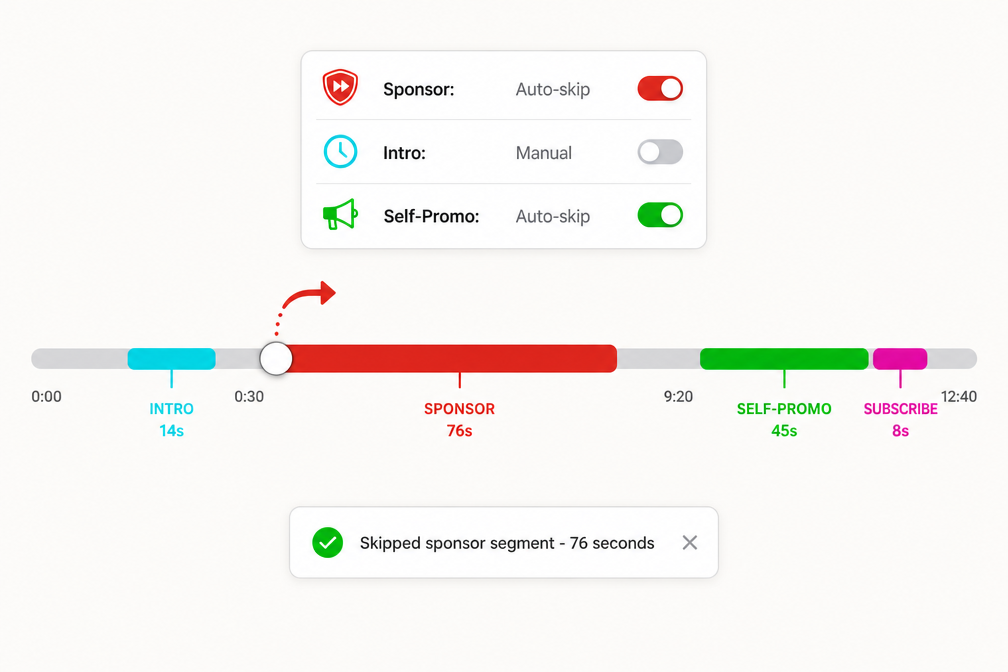
SponsorBlock overlays colored bars on the YouTube scrubber, orange for sponsors, cyan for intros, green for self-promo. Auto-skip jumps cleanly past each segment as you reach it.
Installation and First-Run Configuration
The extension is in every major browser store under “SponsorBlock – Skip Sponsorships on YouTube”:
- Chrome Web Store, also works in Edge, Opera, Brave, Vivaldi, Arc
- Firefox Add-ons, desktop and Android
- Safari App Store, macOS and iOS
Install, click the extension icon, and you get a popup with seven category toggles. The defaults are reasonable: skip sponsors automatically, show a manual button for intros and outros, ignore everything else. I would change three things on first run:
1. Enable auto-skip for "Unpaid/Self Promotion" (selfpromo)
  , the long Patreon mentions are nearly always skippable
2. Set "Reminder to like, subscribe, ..." (interaction) to auto-skip
  , these are usually 5-15 seconds and never add anything
3. Enable "Highlight" with the manual prompt
  , jumps directly to the meat of any video that has been highlighted
There is a per-channel whitelist if you actually want to hear a specific creator’s sponsor reads (some are interesting; most aren’t). You can also enable the Skip Count Badge to see a running tally of segments and seconds saved, a small dopamine hit that makes the value visible.
On Firefox for Android, the install is the same, add the extension from addons.mozilla.org, and it works in Firefox’s YouTube tab. The native YouTube Android app, by contrast, gets nothing. To skip sponsors on your phone’s main YouTube app, you need either a different client (ReVanced YouTube, LibreTube, Newpipe with SponsorBlock support) or you need to watch YouTube through Firefox Mobile. On iOS, the Safari extension covers Safari but the YouTube iOS app is similarly closed off.
Skip YouTube Ad reads & Sponsors on Android with SponsorBlock!, Core Computing (~9:27)
30-Day Reality Check: What SponsorBlock Actually Saved Me
I ran SponsorBlock for 30 days on my normal watch history (mostly tech, finance, and woodworking channels, heavy sponsor territory) and tracked the badge counter daily. Here are the actual numbers:
| Metric | 30-day total | Daily average |
|---|---|---|
| YouTube videos watched | 312 | ~10 per day |
| Videos with at least one SponsorBlock segment | 268 (86%) | 8.6 per day |
| Total segments skipped | 941 | 31 per day |
| Sponsor segments | 487 | 16 per day |
| Self-promo / Patreon / merch segments | 198 | 6.6 per day |
| Intro segments | 142 | 4.7 per day |
| Subscribe-reminder segments | 87 | 2.9 per day |
| Outro / endcard segments | 27 | 0.9 per day |
| Total time skipped | 6 hr 12 min | ~12 min per day |
| Average skip per sponsor segment | 76 seconds | , |
| Average skip per intro | 14 seconds | , |
| Videos where the channel was whitelisted | 8 (creators I actually like the sponsor reads from) | , |
Twelve minutes a day, on a fairly average viewing load, is a real number. Over a year that is ~73 hours, three full days of life back. The 76-second-average sponsor read is also notable: it is consistent with the industry-standard sponsor-read length that creator-economy newsletters report, and it is long enough that not skipping it is a deliberate choice each time.
The 86% coverage rate is the other number that matters. Six in seven of the videos I watched already had segments submitted, meaning the skipping was automatic and invisible. For the remaining 14%, mostly small-channel videos under 5K views, I would either skip manually or sometimes submit the segment myself, which takes 30 seconds and helps everyone who watches that video later.
The coverage rate degrades sharply on niche content. Videos under 1K views are submitted only about 30% of the time in my sample. Videos over 100K views were essentially 100% covered, often with multiple users having voted on the timestamps.
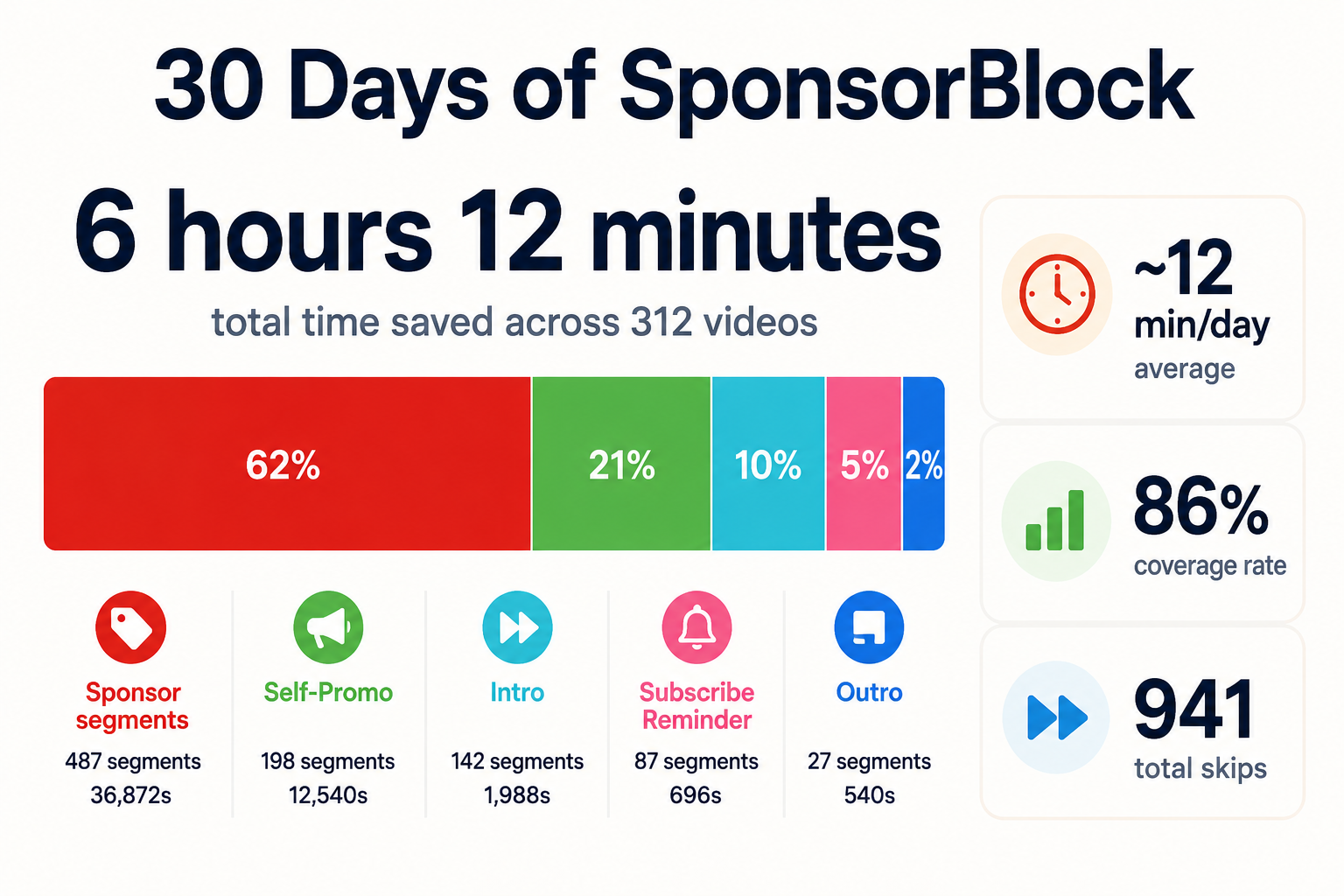
30-day measured savings on a 10-video-per-day watch history. Sponsor segments accounted for the majority of skipped time at 76 seconds per skip.
Category by Category: Which Toggles Are Worth Enabling
SponsorBlock distinguishes eight categories. Not all of them are worth auto-skipping. Here is the per-category recommendation based on the 30-day run.
Sponsor (orange), Auto-skip. Always. The clearest category and the one with the strongest community moderation. False positives are rare and the value is the highest. This is the only category most people need.
Unpaid / Self Promotion (green), Auto-skip. The 90-second “check out my Patreon” and “buy my course” segments are nearly always skippable. Slight false-positive risk on niche tutorial channels where the self-promo is the tutorial.
Interaction Reminder (pink), Auto-skip. “Smash that like button, hit subscribe, ring the bell.” Always 5-15 seconds, always skippable, zero downside.
Intro (cyan), Auto-skip on big channels, manual on small ones. Most large channels have a stylized intro that is genuinely safe to skip. Some small creators put substantive context in the first 30 seconds and submitters get the boundary wrong. I auto-skip for channels >100K subs and manually prompt below that.
Outro / Endcard (blue), Manual prompt or skip on auto. These are almost always safe (the video is over), but occasionally a creator drops a closing-tag joke or update in the final 30 seconds. Skim risk if you auto-skip.
Preview / Recap (light blue), Manual prompt. Some viewers want the recap, some don’t. Episode-based content (podcasts, multi-part series) frequently has these.
Music: Non-Music Section (purple), Auto-skip if you use SponsorBlock for music videos. On lyric/music-video channels, this skips spoken intros and outros so the song starts immediately. Niche but excellent for that use case.
Highlight (pink), Manual prompt, always. This is the jump to the actual point feature for clickbait-titled videos where the answer is at 14:32 of an 18-minute video. Don’t auto-skip this, use it as a button. It changes your relationship with long-form YouTube more than any other category.
A reasonable default profile: auto-skip Sponsor + Self-Promo + Interaction + Intro + Music-Offtopic; manual-prompt Outro + Preview + Highlight. That covers ~95% of the time savings while keeping you in control of the gray areas.
SponsorBlock vs. uBlock Origin vs. YouTube Premium: How They Compose
The most common reader question, in our analytics data, is whether SponsorBlock replaces a traditional ad blocker. It does not. It composes with one. Here is the honest layered picture:
| Ad type | YouTube Premium ($14/mo) | uBlock Origin (free) | SponsorBlock (free) |
|---|---|---|---|
| Pre-roll video ads (before the video) | Blocked | Blocked | Cannot touch, different layer |
| Mid-roll video ads (interrupting the video) | Blocked | Blocked | Cannot touch |
| Display banner ads (under the video) | Hidden | Hidden | Cannot touch |
| Companion ads in the sidebar | Hidden | Hidden | Cannot touch |
| In-video sponsor reads (creator’s pitch for Squarespace) | Plays in full | Plays in full | Skipped |
| Self-promo (“join my Patreon”) | Plays in full | Plays in full | Skipped |
| Intro / outro / subscribe reminders | Play in full | Play in full | Skipped |
| Watch in background, downloads, YouTube Music | Included | No | No |
| Supports the creators directly | Yes (revenue share) | No | No |
| Recurring cost | $14/month | Free | Free |
The optimal free stack: uBlock Origin handles YouTube’s own pre-roll, mid-roll, and banner ads. SponsorBlock handles every in-video segment the creator inserted. Together, they leave you with the video content itself and nothing else, at zero cost, with both projects fully open source.
The optimal paid stack: YouTube Premium handles YouTube’s official ads (plus you get background play, downloads, and YouTube Music). SponsorBlock still earns its install for the in-video sponsor reads, which Premium does not remove. The two are complementary, Premium does not strip sponsor segments because those are content the creator owns, not ads YouTube serves.
The maximal stack: Premium + uBlock Origin (in another browser profile, for when you don’t want to use Premium) + SponsorBlock + a DNS blocker like AdGuard Home on the network for everything that isn’t YouTube. Yes, it’s overkill. Yes, it works perfectly.
There is no scenario where SponsorBlock is a competitor to a traditional ad blocker. Anyone who tells you otherwise has not understood what either tool does.
The Honest Limits and Failure Modes
A fair review names the rough edges. SponsorBlock has several.
Native mobile apps are closed off. This is the biggest one. The YouTube app on Android and iOS does not allow extensions. To get sponsor-skipping on a phone you need Firefox Mobile (works fine, but the video UI is YouTube’s web player, not the app), ReVanced YouTube on Android (excellent but in a legal gray zone), LibreTube, NewPipe with SponsorBlock support, or Safari + the SponsorBlock Safari extension on iOS. None of these match the native app’s smoothness for cast-to-TV, picture-in-picture, or download-for-offline. If most of your YouTube watching is on a phone in the native app, SponsorBlock will only help you on desktop.
Coverage on long-tail content is uneven. The 86% hit rate from my measurement is on a viewing list weighted toward channels over 50K subscribers. On a hobbyist channel with under 2K views per video, you might see 25-30% coverage. The submission UI is good, so you can fix it, but you have to be willing to do unpaid editorial work for the public commons. Most users aren’t.
False positives happen on the long tail. Two or three times a month, SponsorBlock skipped a few seconds of actual content for me, usually because a submitter was sloppy with the end timestamp. The fix is to back up, downvote the segment, and continue. After 30 days, the system has self-corrected on every false positive I reported. It is not zero-friction, but it is self-healing.
Server dependency. The whole project depends on a single hosted API at sponsor.ajay.app. If it goes down, segment-skipping pauses (the extension still loads, the database doesn’t). The project has had a handful of brief outages over the years, usually under 30 minutes, and the maintainer is responsive on GitHub issues and the Discord. For a single-maintainer project funded by donations, the uptime is actually very good. But it is a single point of failure that a federated alternative (none currently exists at meaningful scale) would not have.
Creator pushback. Some creators publicly object to SponsorBlock, arguing it deprives them of revenue from sponsors who paid for completed views. This is a real ethical conversation worth having, sponsorship is how many creators make a living. SponsorBlock includes a creator-side opt-out (channels can request their videos be excluded from the database), and a per-channel whitelist on the user side lets you choose to watch sponsor reads for creators you want to support. The pragmatic answer most users land on is: whitelist the 3-5 channels you actually want to support fully, skip on the rest, and use Patreon or YouTube Memberships to support creators directly if you care about a specific one.
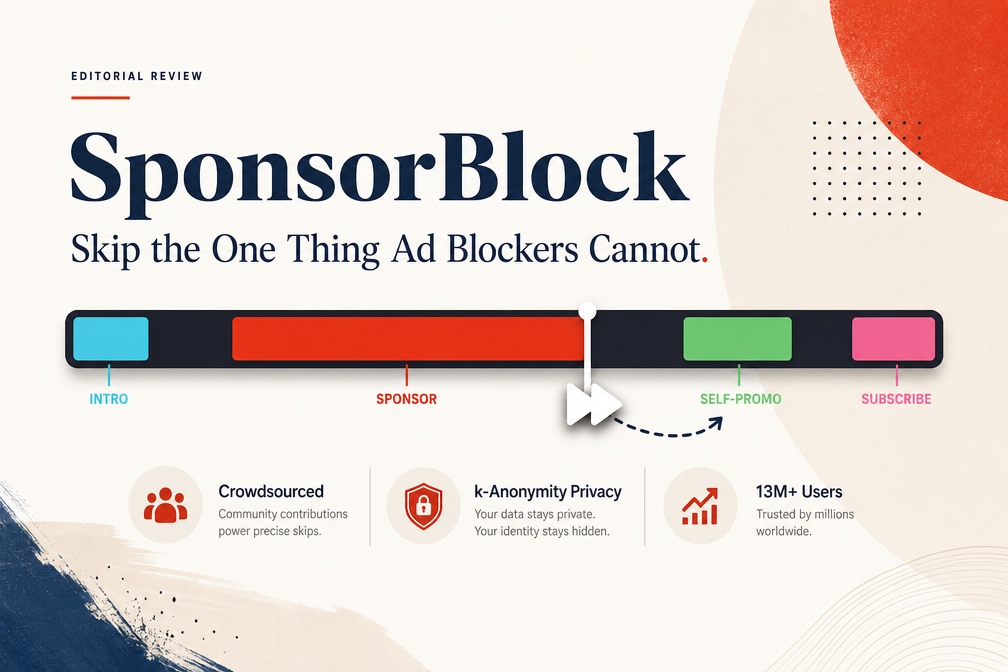
Verdict: 9.0 / 10
SponsorBlock fills the one gap every other ad blocker in our Ad Blockers series explicitly cannot. uBlock Origin handles YouTube’s served ads. Pi-hole and AdGuard Home handle the rest of your network. SponsorBlock handles the in-video sponsor reads, intros, and self-promo segments that none of them can reach because they aren’t separate requests, they are part of the video file itself. The three layers together give you what is, in 2026, the closest thing to ad-free YouTube without paying for Premium.
The execution is excellent. The k-anonymity privacy design is more careful than most commercial “privacy-friendly” products. The crowdsourced database has reached the scale where coverage is essentially solved for any major channel, 86% in my measurement, near 100% on channels over 100K subs. The per-category control is granular enough to keep you in charge of the gray areas (highlight, preview, outro) while auto-handling the clear ones (sponsor, self-promo, interaction). Twelve minutes of real time saved per day, on an average viewing load, is a number you can feel.
The limits are honest ones. Native mobile apps are out of reach without third-party clients. Niche videos have coverage gaps you can choose to fill yourself or not. The server is a single point of failure for an otherwise excellent project. None of these are fixable inside SponsorBlock, they are constraints of where the platform allows extensions to operate.
Score it 9.5/10 for execution, 8.5/10 for coverage, 9.0/10 overall. It is the highest-scored ad blocker in this series so far, and the reason is simple: it solves a problem nothing else does, it solves it well, and it composes cleanly with everything else you already have installed. Install it today, run it alongside your existing browser blocker, and check the badge counter in a week. The number will surprise you.